Capture Review
Capture Review
Capture review is available if you disagree with the quality evaluation for captures that are part of an order. Capture review submissions require a categorization, and a written description of the issue observed after which the capture in question will be reassessed. Updates to a submitted capture review can be tracked via the API or the Tasking Dashboard.
Accept an Invalid Capture
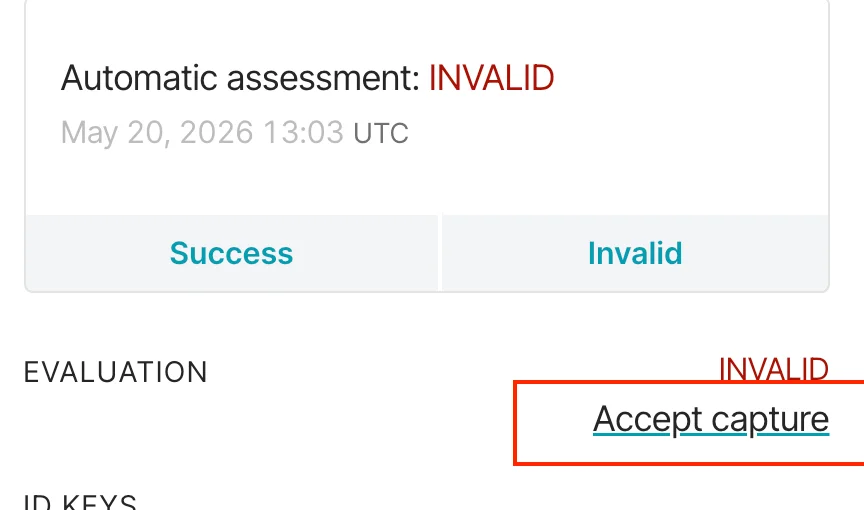
When a capture is assessed as INVALID, you can still accept it if the imagery meets your needs. Accepting a capture
changes its status from INVALID to SUCCESS without a manual review by Planet. The change takes effect immediately.
To accept an INVALID capture in the Tasking Dashboard:
-
Open the Order Detail view and select the
INVALIDcapture. -
Click Accept capture.
-
Click Confirm.
The capture status updates to SUCCESS, and the order creator receives an email notification.
Previously, accepting an INVALID capture required a support ticket and a manual override by Planet. You can now accept
the capture yourself in seconds.
Capture Review API
The Capture Review API consists of the following endpoint, against which you can make GET and POST requests:
https://api.planet.com/tasking/v2/captures/{capture_id}/reviews/
For GET requests, this endpoint accepts a variety of filters as query parameters, which can help you narrow your results
to the desired capture review.
For POST requests, this endpoint accepts data comprising a CaptureReview object, which
minimally contains capture_id, category, and description. Valid category values are as follows: CLOUD_COVER,
HAZE, DISPLACEMENT, BRIGHTNESS_ISSUE, SHADOWS, or OTHER
Please consult the API reference for additional details on either endpoint or the CaptureReview model.
Usage
Assuming a UUID capture id value of 00000000-0000-0000-0000-000000000000, you can make a request to retrieve existing reviews like so:
- CURL
curl --request GET
--url 'https://api.planet.com/tasking/v2/captures/00000000-0000-0000-0000-000000000000/reviews/'
--header "Authorization: api-key $PL_API_KEY"
--header "Content-Type: application/json"
This should return one or more capture reviews corresponding to the open reviews on the provided capture's id.
In order to submit a capture for review, again assuming the above capture id, make a request like so:
- CURL
curl --request POST
--url 'https://api.planet.com/tasking/v2/captures/00000000-0000-0000-0000-000000000000/reviews/'
--header "Authorization: api-key $PL_API_KEY"
--header "Content-Type: application/json"
--data '{
  capture_id: "00000000-0000-0000-0000-000000000000",
  category: "BRIGHTNESS_ISSUE"
  description: "Hello,\n\nThe capture for this order appears too dark. Specifically, ..."
}'
This creates a capture review for the capture with corresponding id, kicking off the reassessment process.
As a general note, you should always provide as much information as possible in the description field which can help expedite the review process.
For more information, please refer to Capture review under the Capture API.
Capture review is also available through the Tasking Dashboard, where you can review captures and track the status of ongoing reviews.