Automated Delivery
Automated Delivery is a functionality within the Tasking API that automates the delivery of satellite imagery assets to your storage destination once captures are published. This feature enables automatic delivery of captures and allows you to request additional deliveries and monitor the delivery status.
When an order is created, a delivery task is automatically created if the contract has support for auto-delivery.
Quick Start
Setting up Automated Delivery is simple:
-
Create and manage your destination in the Destinations UI. See the Destinations API documentation for details.
-
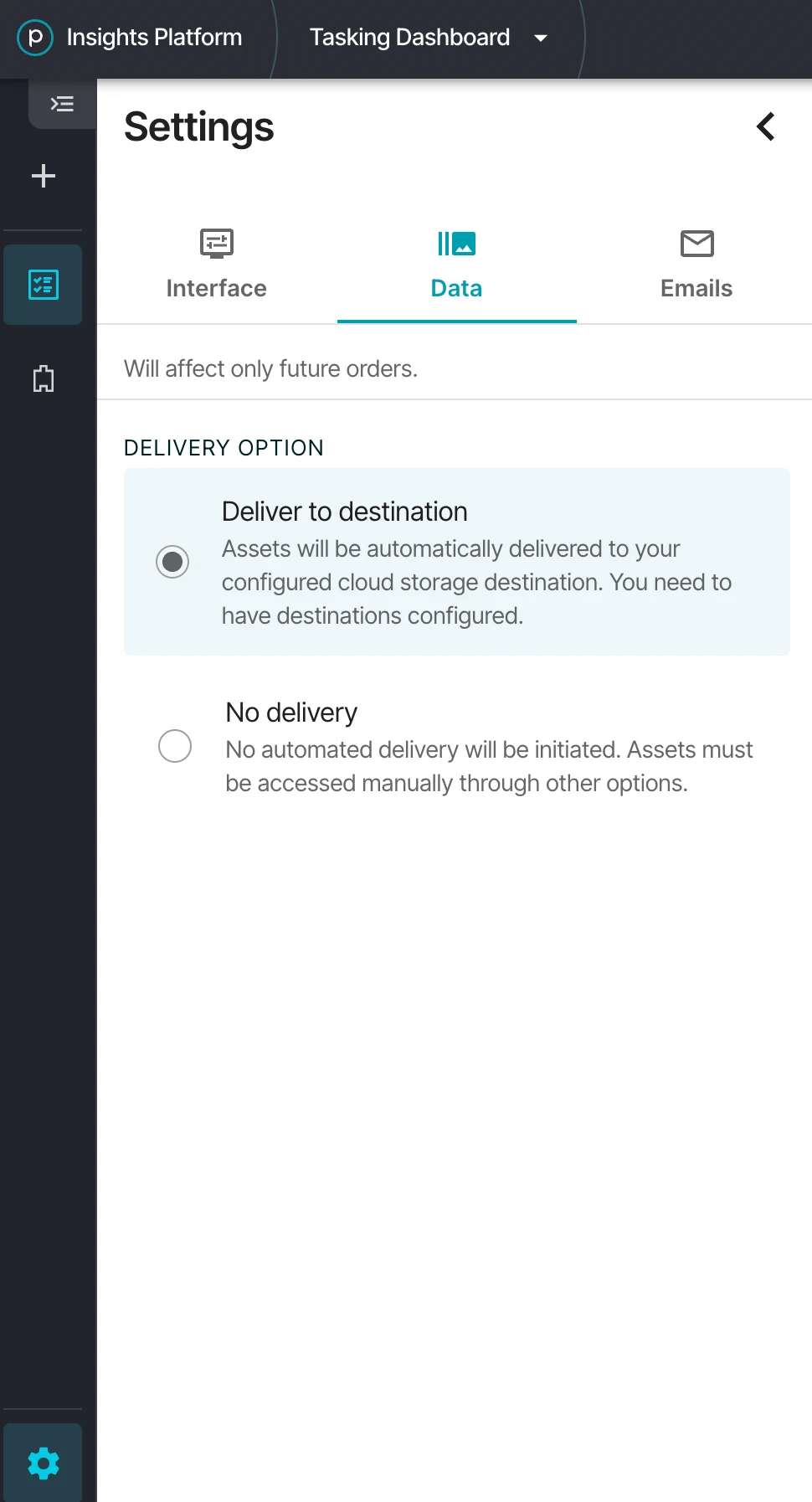
Choose your delivery option in Tasking Dashboard > Settings > Data. Select Deliver to destination to enable Automated Delivery for your future orders.
-
Start tasking and wait for your orders to arrive.
The delivery option is a per-user setting and applies only to orders created after it is set. You can also override the destination on a per-order basis. See Configuring Automated Delivery on Order Create.
The concepts and API endpoints described below allow for more fine-grained observability and control over the delivery process.
Configuring Automated Delivery on Order Create
You can configure the destination and an optional path_prefix for Automated Delivery when creating a Tasking order by including a delivery block in the order payload. Once set, every delivery generated by that order — including redeliveries — inherits these settings unless explicitly overridden.
- CURL
curl --request POST 'https://api.planet.com/tasking/v2/orders/' \
--header 'Accept: application/json' \
--header "Authorization: api-key $PL_API_KEY" \
--header 'Content-Type: application/json' \
--data '{
  "name": "Order 01",
  "geometry": {
    "type": "Point",
    "coordinates": [149.44135, 28.49240]
  },
  "delivery": {
    "destination": {
      "ref": "pl:destinations/my-s3-destination-CKxV9io",
      "path_prefix": "planet-scenes"
    }
  }
}'
To deliver to your organization's default destination, use the default alias:
"delivery": {
  "destination": {
    "ref": "pl:destinations/default",
    "path_prefix": "planet-scenes"
  }
}
Delivery Parameters
| Parameter | Required | Description |
|---|---|---|
delivery.destination.ref | Yes | Destination reference in the form pl:destinations/<id>, or pl:destinations/default to use the organization's default destination. |
delivery.destination.path_prefix | No | Optional string prepended to delivered files. Allowed characters: letters (Unicode included), digits, and _ - . / +. A forward slash (/) is treated as a folder; cannot be at the start or end. Max 128 bytes (UTF-8). |
auto_delivery_destination_id | — | Deprecated. Use delivery.destination.ref instead. Will be removed in a future version. Supplying both shapes with conflicting values will be rejected. |
The delivery block follows the same shape used by the Orders API delivery destinations. See the Destinations API documentation for managing destinations.
How Do I Know If My Order Was Delivered?
You can check the delivery status of your orders in several ways:
- Check delivery task status - Use the GET
/v2/delivery-tasks/endpoint to list all delivery tasks and filter by order ID - Check individual delivery status - Use the GET
/v2/deliveries/endpoint and filter by order ID or capture ID - Monitor status changes - The status field in delivery tasks and deliveries will update as the delivery progresses through its lifecycle
Key Concepts
Automated Delivery follows a defined process for requesting and monitoring the delivery of imagery assets:
- Delivery Task: A request to deliver one or more captures to a specific destination
- Delivery: A specific capture being delivered as part of a delivery task
Delivery Task Lifecycle
Delivery tasks follow a status lifecycle:
- PENDING: Initial state when a delivery task is created
- IN_PROGRESS: At least one delivery has been requested but not all are complete
- COMPLETED: All deliveries have been successfully completed
- FAILED: One or more deliveries have failed
- CANCELLED: The task has been cancelled
Delivery Lifecycle
Individual deliveries follow their own status lifecycle:
- PENDING: Initial state when a delivery is created
- REQUESTED: Delivery request has been sent to the delivery service
- COMPLETED: All expected assets have been delivered successfully
- FAILED: Some expected assets failed to deliver
- CANCELLED: The delivery has been cancelled
Requesting Additional Deliveries
To request an additional delivery of captures, make a POST request to the /v2/delivery-tasks/ endpoint. The request requires a list of capture IDs for the captures you want to deliver.
- CURL
curl --request POST 'https://api.planet.com/tasking/v2/delivery-tasks/' \
--header 'Accept: application/json' \
--header "Authorization: api-key $PL_API_KEY" \
--header 'Content-Type: application/json' \
--data '{
  "capture_ids": [
    "123e4567-e89b-12d3-a456-426614174000",
    "123e4567-e89b-12d3-a456-426614174001"
  ],
  "delivery": {
    "destination": {
      "ref": "pl:destinations/my-s3-destination-CKxV9io",
      "path_prefix": "redelivery/run-2"
    }
  },
  "requested_asset_types": ["ortho_visual", "basic_analytic"]
}'
If the delivery block is omitted, the redelivery reuses the destination and path_prefix of the original delivery task for those captures. Supplying delivery overrides those settings for this redelivery only.
A redelivery to the same destination but a different path_prefix (or different asset types) is allowed; uniqueness is enforced on the (destination, path_prefix, assets, capture) tuple.
Request Parameters
| Parameter | Required | Description |
|---|---|---|
capture_ids | Yes | Array of UUIDs for the captures to be delivered. |
delivery.destination.ref | No | Destination reference (pl:destinations/<id> or pl:destinations/default). If omitted, inherits from the original delivery task. |
delivery.destination.path_prefix | No | Optional string prepended to delivered files. Same format rules as on order create (letters, digits, _ - . / +; no leading/trailing /; max 128 bytes UTF-8). If omitted, inherits from the original delivery task. |
requested_asset_types | No | Array of asset types to deliver. Uses the asset types from the order if omitted. |
The flat delivery_destination_id field is deprecated and will be removed in a future version. Use the nested delivery.destination.ref shape instead.
Response
[
  {
    "id": "12345-e89b-12d3-a456-426614174000",
    "order_id": "67890-e89b-12d3-a456-426614174000",
    "delivery_destination_id": "my-destination-id",
    "pl_ref": "pl:destinations/my-s3-destination-CKxV9io",
    "path_prefix": "redelivery/run-2",
    "requested_asset_types": ["ortho_visual", "basic_analytic"],
    "status": "PENDING",
    "created_time": "2023-09-15T12:26:36.137220Z",
    "updated_time": "2023-09-15T12:26:36.137259Z",
    "deliveries": ["12345-e89b-12d3-a456-426614174000"]
  }
]
Retrieving Delivery Tasks
To get a list of all your delivery tasks, make a GET request to the /v2/delivery-tasks/ endpoint:
- CURL
curl --request GET \
--url 'https://api.planet.com/tasking/v2/delivery-tasks/' \
--header "Authorization: api-key $PL_API_KEY" \
--header 'Content-Type: application/json'
Filtering
You can filter delivery tasks by:
- status
- created_time
- updated_time
- order_id
- delivery_destination_id
- delivery_completed_time
Example:
- CURL
curl --request GET \
--url 'https://api.planet.com/tasking/v2/delivery-tasks/?status=COMPLETED&created_time__gt=2023-01-01T00:00:00Z' \
--header "Authorization: api-key $PL_API_KEY" \
--header 'Content-Type: application/json'
Response
{
  "count": 1,
  "next": null,
  "previous": null,
  "results": [
    {
      "id": "12345-e89b-12d3-a456-426614174000",
      "order_id": "67890-e89b-12d3-a456-426614174000",
      "delivery_destination_id": "my-destination-id",
      "pl_ref": "pl:destinations/my-s3-destination-CKxV9io",
      "path_prefix": "planet-scenes",
      "requested_asset_types": ["ortho_visual", "basic_analytic"],
      "status": "COMPLETED",
      "delivery_completed_time": "2023-09-15T14:30:45.123456Z",
      "created_time": "2023-09-15T12:26:36.137220Z",
      "updated_time": "2023-09-15T14:30:45.123456Z",
      "deliveries": ["12345-e89b-12d3-a456-426614174000"]
    }
  ]
}
Retrieving Deliveries
To get details about specific deliveries, make a GET request to the /v2/deliveries/ endpoint:
- CURL
curl --request GET \
--url 'https://api.planet.com/tasking/v2/deliveries/' \
--header "Authorization: api-key $PL_API_KEY" \
--header 'Content-Type: application/json'
Filtering
You can filter deliveries by:
- status
- created_time
- updated_time
- delivery_task_id
- capture_id
- order_id
- delivery_completed_time
Example:
- CURL
curl --request GET \
--url 'https://api.planet.com/tasking/v2/deliveries/?status=COMPLETED&delivery_task_id=12345-e89b-12d3-a456-426614174000' \
--header "Authorization: api-key $PL_API_KEY" \
--header 'Content-Type: application/json'
Response
{
  "count": 1,
  "next": null,
  "previous": null,
  "results": [
    {
      "id": "12345-e89b-12d3-a456-426614174000",
      "order_id": "67890-e89b-12d3-a456-426614174000",
      "capture_id": "123e4567-e89b-12d3-a456-426614174000",
      "delivery_task_id": "12345-e89b-12d3-a456-426614174000",
      "expected_asset_types": ["ortho_visual", "basic_analytic"],
      "status": "COMPLETED",
      "delivery_completed_time": "2023-09-15T14:30:45.123456Z",
      "created_time": "2023-09-15T12:26:36.137220Z",
      "updated_time": "2023-09-15T14:30:45.123456Z",
      "item_assets": [
        {
          "id": "12345-e89b-12d3-a456-426614174000",
          "item_id": "20230915_085131_12_1234",
          "item_type": "SkySatCollect",
          "delivered_asset_types": ["ortho_visual", "basic_analytic"],
          "failed_asset_types": null
        }
      ]
    }
  ]
}
Limitations
- Capture Status: Only captures in the PUBLISHED state can be delivered.
- Asset Types: Only asset types applicable to the satellite type of the capture can be delivered.
- Destinations: A valid delivery destination must be configured.
For more information about delivery destinations, please refer to the Destinations API documentation.