Copy for LLM[View as Markdown](https://docs.planet.com/develop/apis/tasking/)
# Tasking API
The Planet Tasking API is a programmatic interface that enables customers to manage and request high-resolution imagery collection (for example, from Pelican and SkySat constellations, depending on your contract) in an efficient and automated way. With the Tasking API, you can:
* Create, edit, and cancel High-Resolution Tasking Orders
* Get the status of your order and check the collection progress
* View the metadata on the images tasked in attempting to fulfill their order
* Acquire high-resolution imagery from archive
## Key Concepts
Tasking orders follow a defined process from order creation to order fulfillment to imagery delivery. This section describes the steps and the language used to describe the process and timing of imagery collection and delivery. Planet operates in Universal Time Coordinated (UTC).
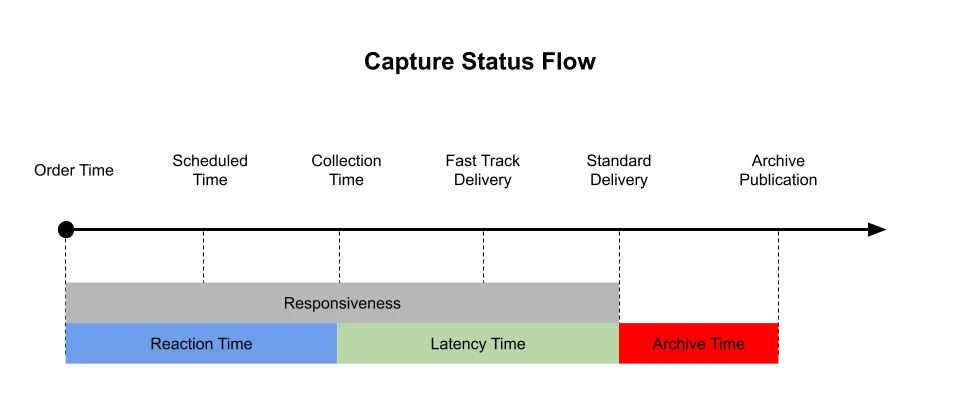
Tasking basics
* **Order Time**: The time when the order was submitted.
* **Scheduled Time**: The time at which the order is accepted and slotted into a satellite’s schedule for collection.
* **Collection Time**: The time when the image is captured.
* **Responsiveness**: The end to end time from order entry to delivery.
* **Reaction Time**: The time between a new tasking order and the collection time.
* **Latency Time**: The time between collection time and delivery (standard or fast track)
* **Standard Delivery**: The standard latency for imagery delivery to customers that place order; deliver according to SLA not as soon as data is ready.
* **Fast Track Delivery**: Expedited delivery, less Latency Time, for imagery delivery as soon as data is available.
* **Archive Time (aka Archive Hold)**: The amount of time between when an image is delivered to a customer and publication to the archive, where it becomes available for other customers to purchase.
* **Archive Publication**: The point in time when an image is published and becomes available to anyone with access to the high-resolution archive.
The Archive Publication feature is available to all high-resolution archive customers. You can choose to set the duration of your Archive Hold from 0 to 30 days. Archive Hold is measured from the date/time of image capture to Archive Publication.
The Planet Tasking API is a REST based API, which can be integrated into any service, regardless of the language used.
### Authentication
The Planet API uses Basic HTTP Authentication and requires that you have a Planet API key. To obtain an API key for Planet's high-resolution tasking, please contact a Planet sales representative.
Once you have an API key, it should be added into the headers of any request made to the Tasking API endpoints. If using **curl** then the following would be an example of this:
* CURL
```
--header "authorization: api-key $PL_API_KEY"
```
An example of Basic HTTP Authentication with Python is included below:
```
# import os module to access enviornmental modules
import os
# import helper functions to make Basic request to Planet API
import requests
from requests.auth import HTTPBasicAuth
# Setup the API Key from the `PL_API_KEY` environment variable
PLANET_API_KEY = os.getenv('PL_API_KEY')
# Set the base URL for the Tasking API
BASE_URL = 'https://api.planet.com/tasking/v2/orders/'
# HTTPBasicAuth() wants a username & password; you can pass an empty string for the password
auth = HTTPBasicAuth(PLANET_API_KEY, '')
# make a request to the Tasking API and test response
res = requests.get(url=BASE_URL, auth=auth)
print(res.status_code)
```
### Formatting
All requests and responses use the JSON format, and uses `snake_case` as the naming convention.
### Headers
The only header, apart from the Authorization header as mentioned above, that is required is the content-type, which should look like this:
* CURL
```
--header 'Content-Type: application/json'
```
### Rate Limiting
The Tasking API reference documents the following general request limits:
* 30 requests per minute (`unauthenticated`)
* 40 requests per second (`burst`)
* 300 requests per minute (`sustained`)
If you exceed a limit, the API returns HTTP `429 Too Many Requests`.
For retry guidance and more information about how these rate limit scopes apply, see [Rate Limiting](https://docs.planet.com/develop/rate-limiting.md) and the [Tasking API reference](https://docs.planet.com/develop/apis/tasking/reference.md).
### GeoJSON
All the geographical coordinate definitions in the Tasking API follow the [GeoJSON](https://geojson.org/) format
## Types of Tasking
The API provides three primary types of tasking.
1. [Flexible tasking](https://docs.planet.com/develop/apis/tasking/flexible_tasking.md) - provides dynamic scheduling of collects and allows more control over resulting image quality
2. [Assured tasking](https://docs.planet.com/develop/apis/tasking/assured_tasking.md) - grants ability to select specific time of interest of tasking
3. [Archive tasking](https://docs.planet.com/develop/apis/tasking/archive_tasking.md) - offers access to high-resolution imagery captured in the past
## Creating a Tasking Order
The creation of an order via the Tasking API is done by sending a POST request to the Tasking API `tasking/v2/orders` endpoint. The creation of Tasking Order can be as simple as the following request example:
* CURL
```
curl --request POST 'https://api.planet.com/tasking/v2/orders/' \
--header 'Accept: application/json' \
--header "Authorization: api-key $PL_API_KEY" \
--header 'Content-Type: application/json' \
--data '{
"name": "Order 01",
"geometry": {
"type": "Point",
"coordinates": [
149.44135,
28.49240
]
}
}'
```
When the PL-Number and Product are not defined in the order POST request, then the Tasking API service will select the default values that are defined for the given api-key. In the majority of cases this will be sufficient and thus the PL-Number and Product do not need to be defined. If a different PL-Number and/or product are to be chosen, then these can simply be defined as part of the order payload:
```
{
"name": "Order 01",
"geometry": {
"type": "Point",
"coordinates": [149.44135, 28.4924]
},
"pl_number": "$PL_CONTRACT_NUMBER",
"product": "one_time_tasking"
}
```
The response will contain the UUID that has been generated to identify the newly created Tasking Order, as well as any geometry created and other values related to the Tasking Order:
```
{
"id": "9d79b9ba-efa3-4e6d-bc08-407b545875a1",
"geometry": {
"type": "Polygon",
"coordinates": [
[
[149.415829, 28.469843],
[149.466885, 28.469843],
[149.466896, 28.514958],
[149.415818, 28.514958],
[149.415829, 28.469843]
]
]
},
"original_geometry": {
"type": "Point",
"coordinates": [149.441357, 28.492403]
},
"order_type": "IMAGE",
"sat_elevation_angle_min": 60.0,
"sat_elevation_angle_max": 90.0,
"start_time": "2020-03-23T12:26:35.820963Z",
"end_time": "2020-04-22T12:26:35.820963Z",
"n_stereo_pov": null,
"is_cancellable": false,
"cancellable_until": "2021-08-05T10:18:00.000000Z",
"requested_sqkm": 25.0,
"created_time": "2020-03-23T12:26:36.137220Z",
"updated_time": "2020-03-23T12:26:36.137259Z",
"name": "test_order_426",
"created_by": "a.user@a.fake.email.address.com",
"status": "RECEIVED",
"fulfilled_sqkm": 0.0,
"capture_status_published_count": 0,
"capture_assessment_success_count": 0,
"capture_assessment_invalid_count": 0,
"scheduling_type": "FLEXIBLE",
"rrule": null,
"exclusivity_days": 0,
"next_planned_acquisition_time": null,
"last_acquired_time": null,
"imaging_window": null
}
```
## Line Orders
The previous example showed how to create a Point Tasking Order, which takes the provided geo-coordinates and generates a 5x5 km square around that point, giving an overall area of 25 km2. If you have two points geographically close to each other that need to be imaged, or require a longer (but not wider) area to be imaged, then defining a **Line** Tasking Order would be more suitable. The difference is that instead of providing a GeoJSON `Point` in the Tasking Order payload, a `LineString` is provided. For example:
* CURL
```
curl --request POST 'https://api.planet.com/tasking/v2/orders/' \
--header 'Accept: application/json' \
--header "Authorization: api-key $PL_API_KEY" \
--header 'Content-Type: application/json' \
--data '{
"name": "Order 01",
"geometry": {
"type": "LineString",
"coordinates": [
[10.92041015625, 48.91527985344383],
[10.78857421875, 49.0738659012854]
]
}
}'
```
## Area Orders
The creation of an Area order requires a GeoJSON object with a given `type` of **"Polygon"** and an array of coordinates representing the polygon that will comprise the area that you want to be captured.
The area, measured in KM2, of the provided polygon should be less than your maximum allowed KM2 for a single Tasking Order.
For assistance in the creation and validation of GeoJSON polygons you can find many resources on the internet, for example .
* CURL
```
curl --request POST 'https://api.planet.com/tasking/v2/orders/' \
--header 'Accept: application/json' \
--header "Authorization: api-key $PL_API_KEY" \
--header 'Content-Type: application/json' \
--data '{
"name": "Area Order 01",
"geometry": {
"type": "Polygon",
"coordinates": [
[
[-111.02062225341797, 39.58637603706183],
[-110.9095573425293, 39.58637603706183],
[-110.9095573425293, 39.670992062375056],
[-111.02062225341797, 39.670992062375056],
[-111.02062225341797, 39.58637603706183]
]
]
}
}'
```
Area orders can only be created as flexible tasking orders. Therefore, the creation, editing and deletion of area orders follows [flexible tasking orders](https://docs.planet.com/develop/apis/tasking/flexible_tasking.md).
## Retrieving your Tasking Orders
Once you have created your Tasking Order, you can check up on it and any other Tasking Orders you may have created by performing a GET request on the same `/orders` endpoint that you used to create your Tasking Orders:
* CURL
```
curl --request GET \
--url https://api.planet.com/tasking/v2/orders/ \
--header "Authorization: api-key $PL_API_KEY" \
--header 'Content-Type: application/json'
```
If you want to retrieve a specific Tasking Order, you would simply append the ID of the Tasking Order to the URL, e.g. `/orders/some_UUID_number`
### Filtering
In the event that you have multiple Tasking Orders, the `/orders` endpoint provides filtering and pagination to help manage the response payload. Through filtering you can ensure that only those Tasking Orders that you want to see are returned. Tasking Orders can be filtered by created, start and end times, name and many other values. For a full list of available parameters see the [API reference documentation for Tasking API](https://docs.planet.com/develop/apis/tasking/reference.md#tag/Orders).
Below is an example of request all Tasking Orders that have a name containing a given string and that were created after a particular date. Note that the created date **must** be a correctly formatted date/time value of the type **"YYYY-mm-ddThh:mm:ssZ"** and that all time are in UTC:
* CURL
```
curl --request GET \
--url 'https://api.planet.com/tasking/v2/orders/?name__icontains=test&created_time__gt=2021-01-01T23:59:59Z' \
--header "Authorization: api-key $PL_API_KEY" \
--header 'Content-Type: application/json'
```
Tasking API provides users with flexible means to filter available records. Filtering in the Tasking API is a part of the `GET` requests made to the `/orders` and `/captures` endpoints. The filtering options are mostly similar for each endpoint, so we will be concentrating on the /orders endpoint in these examples. A full list of all the filters available can be found in the [Tasking API reference](https://docs.planet.com/develop/apis/tasking/reference.md).
Filters in the Tasking API are **AND** operations, which means that each filter parameter is joined with the previous parameters to narrow down the returned results. The following example request to the `tasking/v2/orders` endpoint shows two filters (status & name\_\_icontains) as well as pagination and ordering rules for the returned results:
```
https://api.planet.com/tasking/v2/orders/?status=FULFILLED&name__icontains=Order&limit=50&offset=0&ordering=-updated_time,-created_time
```
### Pagination
The parameters `limit` and `offset` are used to define the boundaries of the response pagination. `limit` defines how many results are returns per page and `offset` determines the starting index of the response. Taking this into account, the following request would return 30 results per page, starting with the 10th possible result:
* CURL
```
curl --request GET \
--url 'https://api.planet.com/tasking/v2/orders/?limit=30&offset=10' \
--header "Authorization: api-key $PL_API_KEY" \
--header 'Content-Type: application/json'
```
The response payload will then include the key `next` and `previous` with the corresponding values containing URLs that will point to the next and previous page of results. The format of these URLs is the same as the original request in the above example.
## Editing a Tasking Order
The ability to edit an existing Tasking Order depends upon what needs to be changed as well as the current status of the Tasking Order in the system. The following table shows what can be edited and in what state. Tasking Orders in the following states **FULFILLED**, **CANCELLED**, **REJECTED** and **EXPIRED** cannot be edited :
| **FIELD** | **PENDING** | **IN\_PROGRESS** |
| ----------- | ----------- | ---------------- |
| start\_time | yes | **no** |
| end\_time | yes | yes |
Rather than a POST request, an edit requires a PUT request to be made. The following command would edit the name and start time of a an existing Tasking Order. The UUID that identifies the order is including as part of the URL:
* CURL
```
curl --request PUT 'https://api.planet.com/tasking/v2/orders/' \
--header 'Accept: application/json' \
--header "Authorization: api-key $PL_API_KEY" \
--header 'Content-Type: application/json' \
--data '{
"start_time": "2020-04-23T12:26:35Z"
}'
```
With a response that shows the updated fields plus the other fields that can be edited:
```
{
"start_time": "2020-05-23T12:26:35.000000Z",
"end_time": "2020-06-23T12:26:35.000000Z"
}
```
## Cancelling Tasking Order
Tasking Order deletion follows similar rules to editing. Tasking Orders can be deleted or cancelled only when the Tasking Order is in one of the following states: **PENDING**, **IN\_PROGRESS** and **RECEIVED**. A Tasking Order deletion is acheived by creating a DELETE request to the tasking/v2/orders endpoint with the ID of the Tasking Order that is to be deleted:
* CURL
```
curl --request DELETE --url 'https://api.planet.com/tasking/v2/orders/' \
--header 'Accept: application/json' \
--header "Authorization: api-key $PL_API_KEY" \
--header 'Content-Type: application/json'
```
Note the lack of a body in the request. A successful request receives a HTTP **204** response
### Charged Cancellation
See the [cancellation policy](https://docs.planet.com/platform/get-started/access-data/task-imagery/manage_orders.md#cancellation-policy) for more information on charged cancellations.
If the cancellation limit of a contract is reached, the cancellation of a Tasking Order will be charged. Users must explicitly agree to a cancellation charge by providing a new query param `accept_cancellation_charge=true` in the DELETE request.
* CURL
```
curl --request DELETE --url 'https://api.planet.com/tasking/v2/orders/?accept_cancellation_charge=true' \
--header 'Accept: application/json' \
--header "Authorization: api-key $PL_API_KEY" \
--header 'Content-Type: application/json'
```
Otherwise, the request will be rejected with a `400` status code and an error message.
To verify how many assured cancellations have been made, take the following steps:
1. Retrieve all orders with status `CANCELLED` and `PENDING_CANCELLATION` with a given `updated_time` and `pl_number`
* CURL
```
curl --request GET --url 'https://api.planet.com/tasking/v2/orders/?updated_time__gt=&pl_number=&status__in=CANCELLED,PENDING_CANCELLATION&scheduling_type=ASSURED"a_units=CREDITS&fields=name,cancelled_time,id,listing&limit=50&offset=0' \
--header 'Accept: application/json' \
--header "Authorization: api-key $PL_API_KEY" \
--header 'Content-Type: application/json'
```
2. It's still possible for an order to change after it has been cancelled, making that order's `updated_time` later than the `cancelled_time`. So for each order returned, check that the `cancelled_time` is after midnight UTC of the requested day. Orders in status `PENDING_CANCELLATION` do not have `cancelled_time` but they still count towards the total number of free cancellations.
## Tasking Order Pricing
Users can obtain detailed pricing information for an order (created after March 2024) by using the GET `/orders/:order_id/pricing` endpoint:
* CURL
```
curl --request GET \
--url https://api.planet.com/tasking/v2/orders//pricing \
--header "Authorization: api-key $PL_API_KEY" \
--header 'Content-Type: application/json'
```
The response provides information on how the price was calculated by specifying quota units, the `determined_by` field (which can be either `pricing_model` or `replaced_orders`), and applied `multipliers`.
### Example of pricing determined by `pricing_model`
```
{
"order_id": "87c66e26-adf5-4109-85b7-2056347372ea",
"units": "SQKM",
"estimated_quota_cost": 70.48,
"determined_by": "pricing_model",
"pricing_model": {
"base_price": 70.48,
"multipliers": [
{
"name": "imaging_mode",
"value": 1.0,
"description": "single-image"
}
]
}
}
```
### Example of Pricing Determined by `replaced_orders`
If `determined_by` is `replaced_orders` it means that some other orders had to be cancelled to create this order. In this case, `estimated_quota_cost` is the sum of the replaced orders:
```
{
"order_id": "b79eaa77-8d74-4803-9dba-dbc33760021f",
"units": "SQKM",
"estimated_quota_cost": 75.0,
"determined_by": "replaced_orders",
"pricing_model": {
"base_price": 25.0,
"multipliers": [
{
"name": "imaging_mode",
"value": 1.0,
"description": "normal"
},
{
"name": "tasking_tier",
"value": 1.0,
"description": "normal"
}
]
},
"replaced_orders": [
{
"order_id": "b9635a07-ee04-4b7b-9406-222444167018",
"name": "PLANET_476-fb96f79c-a973-4815-9817-b7dd2e84c32a_240424_250424_11",
"cost": 25.0
},
{
"order_id": "acd778f0-c490-4c9b-916a-5d736db4b04f",
"name": "PLANET_475-228e2124-3d6b-477c-a3f8-b25e9a17fb40_240424_250424_11",
"cost": 25.0
},
{
"order_id": "38a34626-71a3-448b-acd5-76831b4da9c8",
"name": "PLANET_471-c607489a-8b4d-42af-86c9-54cbd3690028_240424_250424_11",
"cost": 25.0
}
]
}
```
## Tasking Order Pricing Preview
Users can obtain detailed estimated pricing information before creating an order by using the POST `/pricing/` endpoint and sending an order-like payload as the input. The required fields for requesting the pricing are:
* `geometry`: a GeoJSON object
* `imaging_window`: ID of the imaging window (`ASSURED` orders only)
All other fields are optional (see [flexible tasking](https://docs.planet.com/develop/apis/tasking/flexible_tasking.md)).
### Single Order Estimation
* CURL
```
curl --request POST \
--url https://api.planet.com/tasking/v2/pricing/ \
--header "Authorization: api-key $PL_API_KEY" \
--header 'Content-Type: application/json' \
--data '{
"pl_number": "$PL_CONTRACT_NUMBER",
"product": "Assured Tasking",
"geometry": {"type":"Point","coordinates":[40.716725,64.598217]}
}'
```
The response is the same as for an existing order pricing (see [tasking order pricing](#tasking-order-pricing)) excluding `order_id`.
### Multiple Orders Estimation (bulk)
* CURL
```
curl --request POST \
--url https://api.planet.com/tasking/v2/pricing/ \
--header "Authorization: api-key $PL_API_KEY" \
--header "Content-Type: application/json" \
--data '[
{
"geometry": {
"type": "Point",
"coordinates": [40.716725, 64.598217]
}
},
{
"geometry": {
"type": "Point",
"coordinates": [40.716725, 64.598217]
}
}
]'
```
The response includes `pricing_details` array containing pricing information for each order payload (in the same order as the orders input payload), and a `total_estimated_quota_cost`, which is the sum of the `estimated_quota_cost` for each order:
```
{
"total_estimated_quota_cost": 50.0,
"pricing_details": [
{
"units": "SQKM",
"estimated_quota_cost": 25.0,
"determined_by": "pricing_model",
"pricing_model": {
"base_price": 25.0,
"multipliers": [
{
"name": "imaging_mode",
"description": "single-image",
"value": 1.0
}
]
}
},
{
"units": "SQKM",
"estimated_quota_cost": 25.0,
"determined_by": "pricing_model",
"pricing_model": {
"base_price": 25.0,
"multipliers": [
{
"name": "imaging_mode",
"description": "single-image",
"value": 1.0
}
]
}
}
]
}
```
In the event of partial failures, errors are returned for the corresponding order input payload and are not included in the calculation of `total_estimated_quota_cost`:
```
{
"total_estimated_quota_cost": 88.775,
"pricing_details": [
{
"message": {
"error": "Failed to calculate order pricing."
}
},
{
"units": "SQKM",
"estimated_quota_cost": 25.0,
"determined_by": "pricing_model",
"pricing_model": {
"base_price": 25.0,
"multipliers": [
{
"name": "imaging_mode",
"description": "single-image",
"value": 1.0
}
]
}
},
{
"units": "SQKM",
"estimated_quota_cost": 63.775,
"determined_by": "pricing_model",
"pricing_model": {
"base_price": 63.775,
"multipliers": [
{
"name": "imaging_mode",
"description": "single-image",
"value": 1.0
}
]
}
}
]
}
```
## Bulk Operations
Tasking API provides facilities for bulk order operations. Orders can be submitted, updated or cancelled in bulk. Before going into the various aspects of Bulk creation, editing and cancellation, we will first look at the different statuses that can be attributed to a bulk operation. A bulk operation can have one of the following statuses:
* **PENDING** : The bulk request has been received but work has yet to start on processing the payload.
* **RUNNING** : Work has starting on processing the payload.
* **COMPLETE** : The processing of the payload has finished.
### Bulk Create
POSTing to the bulk endpoint allows up to 1000 Tasking Orders to be created in a single, asynchronous, request.
When putting together the bulk tasking order request you can optionally specify your own bulk tasking order ID beforehand, but it **must** be a UUID string otherwise it will be rejected. If no UUID is provided, one will be generated and returned as part of the response header **location** field (see below) This example also only creates point orders, but any order type can be created via a bulk request.
* CURL
```
curl --request POST --url 'https://api.planet.com/tasking/v2/bulk/' \
--header 'Accept: application/json' \
--header "Authorization: api-key $PL_API_KEY" \
--header 'Content-Type: application/json' \
--data '{
"id": "example_uuid_string",
"order_payloads": [
{
"name": "Bulk order 1",
"geometry": {
"type": "Point",
"coordinates": [32.142035, -0.487188]
}
},
{
"name": "Bulk order 2",
"geometry": {
"type": "Point",
"coordinates": [52.142035, 13.487188]
}
},
{
"name": "Bulk order 3",
"geometry": {
"type": "Point",
"coordinates": [181, 40]
}
}
]
}'
```
There is no payload as part the response when the request is successful, and the response code is a **202**, which denotes an asynchronous response. Included in the **headers** of the response is a **location** field which contains the URL that can be used for requesting the status of bulk order which is a GET request to the same endpoint, but this time appending the UUID that is used to identify the original bulk POST request to the URL:
* CURL
```
curl --request GET --url 'https://api.planet.com/tasking/v2/bulk/example_uuid_string' \
--header 'Accept: application/json' \
--header "Authorization: api-key $PL_API_KEY" \
```
This time the response, when successful, will return with a response code of **200** and a JSON payload that will look similar to the following:
```
{
"id": "example_uuid_string",
"start_time": "2020-03-20T13:27:28.501032Z",
"end_time": "2020-03-20T13:27:30.317499Z",
"operation_type": "CREATE",
"payload_count": 3,
"status": "COMPLETE",
"processing_payload_count": 0,
"failed_payload_count": 1,
"successful_payload_count": 2
}
```
Note the `operation_type` is set to **CREATE** and that the `status` is **COMPLETE**.
In this example the two tasking orders that comprised the original bulk tasking order POST request were successfully ingested, so there is no need to go further. However, if there are any tasking orders that are still in processing or maybe even failed for some reason then a more detailed response can be requested, using the same URL as the previous GET request but with `/payloads` appended to the URL:
* CURL
```
curl --request GET --url 'https://api.planet.com/tasking/v2/bulk/example_uuid_string/payloads' \
--header 'Accept: application/json' \
--header 'authorization: api-key $PL_API_KEY'
```
This will return a list of all the payloads in the original bulk POST, with the extra provided detail:
```
{
"count": 3,
"next": null,
"previous": null,
"results": [
{
"id": "921be80b-b351-4e2b-afba-3384aa0b63e9",
"bulk_process": "BulkProcess object (d722f658-cf66-4d00-8d3c-e286d5ca77ee)",
"order_id": "493d3e9e-176d-4617-b932-d7961f60949e",
"payload": {
"name": "Bulk order 1",
"altitude": 0,
"end_time": "2020-05-30T23:00:00Z",
"geometry": {
"type": "Point",
"coordinates": [32.142035, -0.487188]
},
"start_time": "2020-04-28T00:00:00Z"
}
},
{
"id": "a1b4fd59-1b80-4fff-b670-659a64c0ba1e",
"bulk_process": "BulkProcess object (d722f658-cf66-4d00-8d3c-e286d5ca77ee)",
"order_id": "178631b4-f23e-46e6-a77b-789cc164fdbe",
"payload": {
"name": "Bulk order 2",
"altitude": 0,
"end_time": "2020-05-30T23:00:00Z",
"geometry": {
"type": "Point",
"coordinates": [32.142032, -0.487199]
},
"start_time": "2020-04-28T00:00:00Z"
}
},
{
"id": "6fdf32db-a385-4034-8e13-c6b312ce297f",
"bulk_process": "BulkProcess object (d722f658-cf66-4d00-8d3c-e286d5ca77ee)",
"payload": {
"name": "Bulk order 3",
"altitude": 0,
"end_time": "2020-05-30T23:00:00Z",
"geometry": {
"type": "Point",
"coordinates": [181, 40]
},
"start_time": "2020-04-28T00:00:00Z"
},
"error": "{\"geometry\":[\"Geometry longitude coordinate needs to be within -180.0 and 180.0\"]}"
}
]
}
```
### Bulk Edit
The Bulk edit endpoint allows the editing of multiple Tasking Orders in a single request, negating the need to make multiple requests for multiple Tasking Orders. The request for bulk editing Tasking Orders is very much the same as the one for bulk creation, but with the inclusion of the `operation_type` field, which is an optional parameter that defaults to CREATE (which is why we didn't include it in the bulk create example) but can also be set to EDIT and CANCEL (the cancel example is further down).
**Considerations**
* This will only work for Tasking Orders that are in the system. Because of this each, Tasking Order to be edited must be identified by its ID.
* Fields that are not present in the order payloads are left alone.
* The `operation_type` must be set as **EDIT**
* A UUID for the bulk process is optional.
* The process is asynchronous.
* The editing of Tasking Orders via bulk follow the same rules as defined [here](#editing-a-tasking-order)
A curl request would look similar to this:
* CURL
```
curl --request POST 'https://api.planet.com/tasking/v2/bulk/' \
--header 'Accept: application/json' \
--header "Authorization: api-key $PL_API_KEY" \
--header 'Content-Type: application/json' \
--data '{
"order_payloads": [
{
"id": "order_UUID",
"start_time": "2021-04-29T00:00:00Z"
},
{
"id": "order_UUID_2",
"end_time": "2021-05-29T00:00:00Z"
}
],
"operation_type": "EDIT"
}'
```
As with the Bulk creation workflow, there is no payload as part the response when the request is successful, and the response code is a **202**, which denotes an asynchronous response. Included in the **headers** of the response is a **location** field which contains the URL that can be used for requesting the status of bulk edit which is a GET request to the same endpoint, but this time appending the UUID that is used to identify the original bulk POST request to the URL:
* CURL
```
curl --request GET --url 'https://api.planet.com/tasking/v2/bulk/example_uuid_string' \
--header 'Accept: application/json' \
--header "Authorization: api-key $PL_API_KEY" \
```
This time the response, when successful, will return with a response code of **200** and a JSON payload that will look similar to the following:
```
{
"id": "5d11a1ed-4179-45f8-a9b4-65bc40c4bf64",
"start_time": "2021-03-19T14:28:51.141569Z",
"end_time": null,
"operation_type": "EDIT",
"payload_count": 2,
"status": "RUNNING",
"processing_payload_count": 2,
"failed_payload_count": 0,
"successful_payload_count": 0
}
```
Note that the `operation_type` is **EDIT**, reflecting the type of the original bulk request.
### Bulk Cancel
Bulk cancellation allows multiple Tasking Orders that exist in the system to be cancelled with a single POST request, with the following caveat: **only Tasking Orders with the statuses PENDING and IN\_PROGRESS may be cancelled**
**Considerations**
* This will only work for Tasking Orders that are in the system. Because of this each Tasking Order to be cancelled must be identified by its ID.
* The `operation_type` must be set as **CANCEL**
* A UUID for the bulk process is optional
* The process is asynchronous
A curl request would look similar to this:
* CURL
```
curl --request POST --url 'https://api.planet.com/tasking/v2/bulk/' \
--header 'Accept: application/json' \
--header "Authorization: api-key $PL_API_KEY" \
--header 'Content-Type: application/json' \
--data '{
'order_payloads': [
{
'id': 'order_UUID'
},
{
'id': 'order_UUID_2'
}],
'operation_type': 'CANCEL'
}'
```
As with the Bulk creation workflow, there is no payload as part the response when the request is successful, and the response code is a **202**, which denotes an asynchronous response. Included in the **headers** of the response is a **location** field which contains the URL that can be used for requesting the status of bulk edit which is a GET request to the same endpoint, but this time appending the UUID that is used to identify the original bulk POST request to the URL:
```
{
"id": "7ed1516b-e65b-4886-a82d-5237b5738dd3",
"start_time": "2021-03-19T15:18:22.131747Z",
"end_time": "2021-03-19T15:18:22.850360Z",
"operation_type": "CANCEL",
"payload_count": 2,
"status": "COMPLETE",
"processing_payload_count": 0,
"failed_payload_count": 0,
"successful_payload_count": 2
}
```
Note that the `operation_type` is **CANCEL**, reflecting the type of the original bulk request.
#### Charged cancellation
Similar to single order cancellation, bulk order cancellation can be charged if the cancellation limit of a contract is reached.
Users must explicitly agree to a cancellation charge by providing a new field `accept_cancellation_charge=true` in the body POST request.
* CURL
```
curl --request POST 'https://api.planet.com/tasking/v2/bulk/' \
--header 'Accept: application/json' \
--header "Authorization: api-key $PL_API_KEY" \
--header 'Content-Type: application/json' \
--data '{
"order_payloads": [
{
"id": "order_UUID",
"accept_cancellation_charge": true
},
{
"id": "order_UUID_2",
"accept_cancellation_charge": true
}
],
"operation_type": "CANCEL"
}'
```
## Capture Status
Depending on the order configuration and quality specifications, there may be multiple attempts at collecting the required AoI.
Each capture of an order has a status, so that you may follow along with where that capture is at in its lifecycle to inform expectations on acquisition or when an image might be published. The diagram below outlines how captures flow through the system.
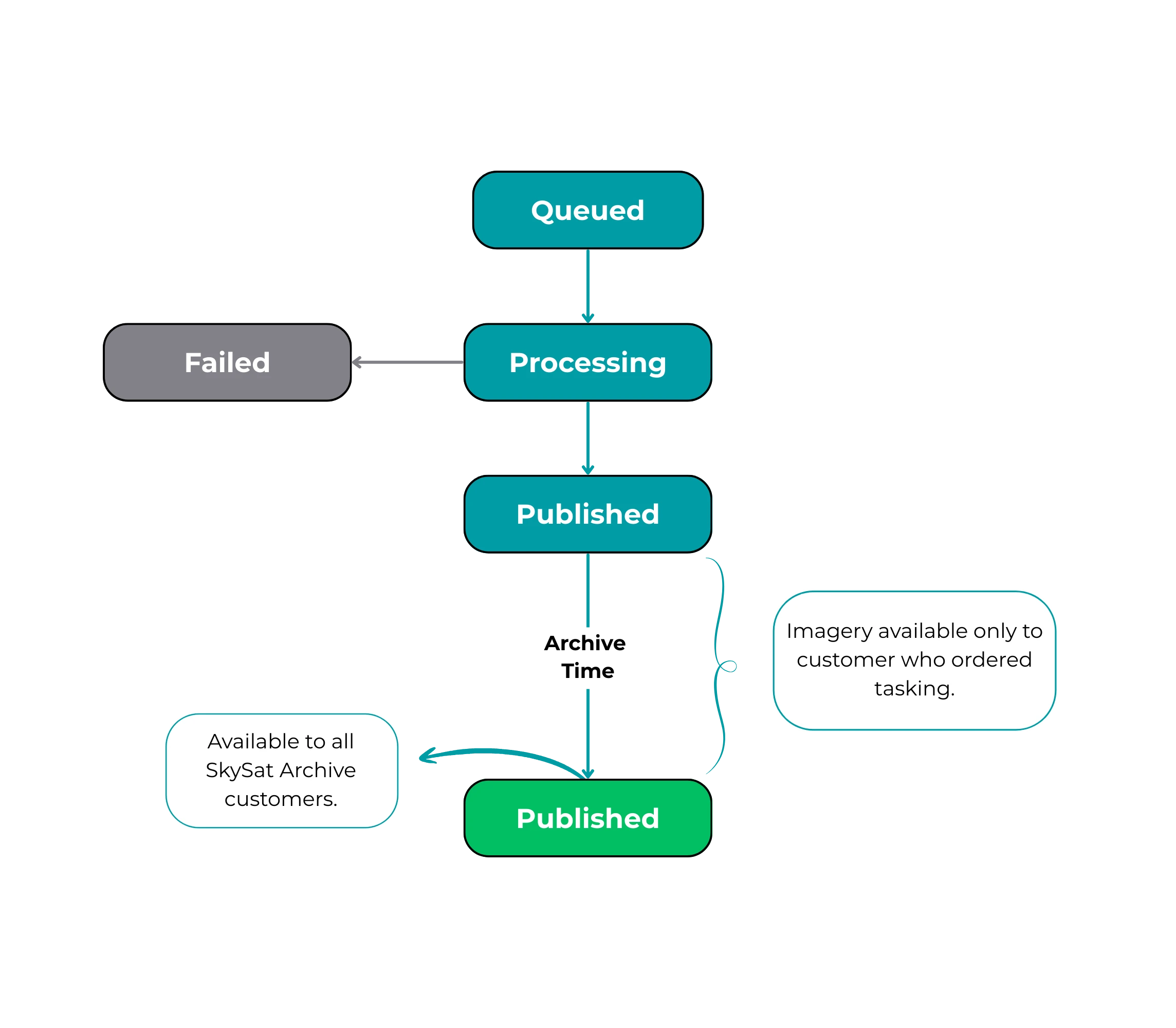
Capture status
* **Queued**: The capture has been created and sent to a satellite. It will be imminently acquired and downlinked.
* **Processing**: The capture has been downlinked and is in our processing pipeline.
* **Published**:
* Captures are published first to the customer who ordered the image. Only other users in this user’s organization may see this collect during this archive time period.
* After the Archive Time period has elapsed the imagery is published to all customers who have access the high-resolution archive.
* **Failed**: The capture has failed to be captured or failed in processing.
### Capture Status Example
To see the status of your order’s captures, you can make a GET request for captures, filtering by order id(s). You can also filter by additional capture metadata. See our [API reference](https://docs.planet.com/develop/apis/tasking/reference.md) for more information.
Endpoint
```
https://api.planet.com/tasking/v2/captures/?order_id=
```
Response example
```
{
"count": 1,
"next": null,
"previous": null,
"results": [
{
"id": "1e0268d2-8c96-49ed-b809-eceafa563950",
"assessment": "SUCCESS",
"updated_time": "2019-09-21T23:57:43.783444Z",
"acquired_time": "2019-09-21T08:51:31.094000Z",
"published_time": "2019-09-21T23:57:43.783444Z",
"status": "PUBLISHED",
"status_description": null,
"strip_id": "s104_20190921T085131Z",
"cloud_cover": 0.16,
"item_types": [
"SkySatScene",
"SkySatCollect"
]
}
]
}
```
# Stereo Orders
The creation, editing and deletion of Stereo orders follows the same rules as normal [orders](#creating-a-tasking-order) with one extra field required during creation.
* CURL
```
curl --request POST 'https://api.planet.com/tasking/v2/orders/' \
--header 'Accept: application/json' \
--header "Authorization: api-key $PL_API_KEY" \
--header 'Content-Type: application/json' \
--data '{
"name": "Stereo Order 01",
"geometry": {
"type": "Point",
"coordinates": [
-110.974052,
39.634139
]
},
"order_type": "STEREO",
"n_stereo_pov": "2"
}'
```
Two field to take note of with a stereo order are the **order\_type** field, which is defined and set to **STEREO** as well as the **n\_stereo\_pov** parameter. **n\_stereo\_pov** defines how many shots are taken for the stereo image can be either **2** or **3**. Any other value will result in an error. Stereo captures are supported by Flexible and Assured tasking, but depend on product configuration.
## Quality Assessment and Delivery
Tasking products come with a set of quality requirements every collected capture should match. Every collected capture is assessed to match the specified criterias in a process called quality assessment. Types of available checks include rectification quality review, target geometry coverage, cloud/haziness evaluation and manual operator review. Specific configuration of checks and threshold values are defined in the tasking product used to create an order.
**A capture will be assessed as** `SUCCESS` if all required checks meet specification. The order state will change from `IN_PROGRESS` to `FULFILLED`.
**A capture will be assessed as** `INVALID` if the required specifications were not met. The order behavior may vary, see 'Retasking' below.
It is possible to request additional review of imagery for a limited time if you disagree with the quality evaluation for an order. Please see [Requesting an Additional Review](https://docs.planet.com/platform/get-started/access-data/task-imagery/manage_orders.md#requesting-an-additional-review) for more information.
## Retasking
When an assured product is used, there is only one opportunity to collect an image in the specified moment of time determined by user's choice of imaging window. For flexible tasking products however, tasking will continue until either a fulfilling capture is collected, or the end time of an order expires. Effectively, multiple captures can be collected before an order may be fulfilled. The order state for this time will remain `IN_PROGRESS`. Publication of a fulfilling capture will transition the order into `FULFILLED` state.
## Edge Cases
Our team works hard to provide a most predictable tasking experience. However, sometimes things do not go as anticipated and it may create edge case scenarios where tasking API behaviour may be surprizing.
Most common edge case happens when tasking order expires before the fulfilling capture is published. When this happens, the order that was 'EXPIRED' will transition immediately to 'FULFILLED' and a published capture will become available.
As part of manual review, a capture evaluated by the system may be manually reassessed, which may cause its order’s state to change. For example, a capture the system marked as `SUCCESS` may be manually reviewed as `INVALID` changing its order’s state from `FULFILLED` to `IN_PROGRESS` (or `EXPIRED`). Similar order state changes would be expected for a capture marked `INVALID` which was manually reviewed as a `SUCCESS`. Typically any manual review happens within 24 hours of capture publish and changes to an order’s state due to manual assessment after this time are unlikely.
## Standard Delivery and Archive
As part of Planet’s mission to make high-resolution data more accessible and actionable, Tasking orders, by default, are automatically published to the High-Resolution Archive. However, if you have the “30-day SkySat Archive withhold” product, you can withhold orders from the high-resolution archive (for example, SkySat Archive) for up to 30 days.
If you have the “30-day SkySat Archive withhold” offering, you can request that your CSM set a number of days — up to 30 — to withhold the data from the high-resolution archive. In the Order details view, you can see the number of days you’ve requested in the “Exclusivity days” field.
To derive the archive publication date, add the number of exclusivity days to date of acquisition. If you want to calculate this from the API, take the following steps:
1. Retrieve the order via the `v2/orders/{order_id}` endpoint. The response includes a field called `exclusivity_days`, which indicates the exclusivity period for captures attributed to that tasking order.
2. Then make a second call to `v2/captures/?order_id={order_id}&status=PUBLISHED`, which returns all captures for the given tasking order that have been published.
3. For each returned capture, take the date stored in the `acquired_time` field and add the number of `exclusivity_days` to it to find the date when that capture’s exclusivity period ends. For example, if the `acquired_time` is 2020-10-10T12:00:00 and the `exclusivity_days` value is 30, then the exclusivity period for that capture will end on 2020-11-09T12:00:00. Note that `acquired_time` is always UTC.