Copy for LLM[View as Markdown](https://docs.planet.com/develop/apis/orders/)
# Orders Overview
The Orders API allows you to activate Planet Imagery and Mosaics directly on the platform or deliver the data to external cloud storage.
This API is designed for ordering items by catalog ID. For instructions on ordering items by query, please refer to our [Subscriptions Documentation](https://docs.planet.com/develop/apis/subscriptions.md).
The Orders API is optimized for smaller-scale orders, with a limit of 500 items per request. When using [zip delivery](https://docs.planet.com/develop/apis/orders/delivery.md#zipping-results) with SkySatCollect, TanagerScene, or PelicanScene item types, the limit is reduced to 50 items per order. If you need to deliver a larger volume of scenes, we recommend using the [Subscriptions API](https://docs.planet.com/develop/apis/subscriptions.md) for more efficient bulk management.
## Orders API Components
### [Mechanics](https://docs.planet.com/develop/apis/orders/mechanics.md)
[Learn how to order scenes and mosaics from the Planet API with examples in curl, Python SDK, and the Planet CLI](https://docs.planet.com/develop/apis/orders/mechanics.md)
### [Sources](https://docs.planet.com/develop/apis/orders/sources.md)
[Learn about how to order scenes and mosaics](https://docs.planet.com/develop/apis/orders/sources.md)
### [Product Bundles](https://docs.planet.com/develop/apis/orders/product_bundles.md)
[Choose a product bundle to order desired assets](https://docs.planet.com/develop/apis/orders/product_bundles.md)
### [Tools](https://docs.planet.com/develop/apis/orders/tools.md)
[Hosted raster operations to prepare data for your area of study](https://docs.planet.com/develop/apis/orders/tools.md)
### [Notifications](https://docs.planet.com/develop/apis/orders/notifications.md)
[Set email and webhook notifications to follow order progress](https://docs.planet.com/develop/apis/orders/notifications.md)
### [Delivery](https://docs.planet.com/develop/apis/orders/delivery.md)
[Download scenes and mosaics or deliver to the cloud](https://docs.planet.com/develop/apis/orders/delivery.md)
### [API Reference](https://docs.planet.com/develop/apis/orders/reference.md)
## Service Contract
The following is a high-level overview of the Orders API service contract. The full spec for each endpoint can be found in the [API Reference](https://docs.planet.com/develop/apis/orders/reference.md).
* **name**: The name of the order.
* **[source\_type](https://docs.planet.com/develop/apis/orders/sources.md)**: The source imagery type for all orders. Options are `scenes` and `basemaps`.
* **products**: The products from the [Data API](https://docs.planet.com/develop/apis/data.md) or [Basemaps API](https://docs.planet.com/develop/apis/basemaps.md) to order.
* **[tools](https://docs.planet.com/develop/apis/orders/tools.md)**: The raster tools to apply to the ordered imagery.
* **[delivery](https://docs.planet.com/develop/apis/orders/delivery.md#delivery-to-cloud-storage)**: The cloud storage delivery location for the order.
* **[hosting](https://docs.planet.com/develop/apis/orders/delivery.md#hosting)**: The hosting location for the order.
* **[notifications](https://docs.planet.com/develop/apis/orders/notifications.md)**: The notifications to send for the order.
## Rate Limits
Learn about rate limits in the [Rate Limits Overview](https://docs.planet.com/develop/rate-limiting.md).
The following rate limits are currently in place by endpoint:
| Endpoint | Rate Limit
(r/s, per API key) |
| ------------------------------------------------------------------------------------------------------------- | ---------------------------------- |
| [Bulk Cancel](https://docs.planet.com/develop/apis/orders/reference.md#tag/Orders/operation/bulkCancelOrders) | 5 |
| [Cancel](https://docs.planet.com/develop/apis/orders/reference.md#tag/Orders/operation/cancelOrder) | 3 |
| [Create](https://docs.planet.com/develop/apis/orders/reference.md#tag/Orders/operation/createOrder) | 3 |
| [Download](https://docs.planet.com/develop/apis/orders/reference.md#tag/Orders/operation/downloadOrder) | 5 |
| [Get](https://docs.planet.com/develop/apis/orders/reference.md#tag/Orders/operation/getOrder) | 3 |
| [List](https://docs.planet.com/develop/apis/orders/reference.md#tag/Orders/operation/listOrders) | 3 |
| [Spec](https://docs.planet.com/develop/apis/orders/reference.md#tag/Orders/operation/getSpec) | 10 |
| [Stats](https://docs.planet.com/develop/apis/orders/reference.md#tag/Orders/operation/stats) | 5 |
## Limits on Active Orders
There is a global limit of 10,000 active orders per organization, where active includes both queued and running orders. When this limit is reached, additional order creation requests are rejected with a 409 Conflict response until existing orders complete.
The rate at which orders transition from queued to running is determined by a property of the organization’s service plan known as concurrent weight. This setting governs the total processing capacity available at any given time. The weight of an individual order depends on the number of assets it contains; orders with more assets consume more concurrent weight and are scheduled accordingly. As a result, organizations with higher concurrent weight allocations are able to run more or larger orders in parallel.
## Errors
Refer to the [errors overview](https://docs.planet.com/develop/errors.md) for information on conventional HTTP response codes.
## States
Order `state` represents the state of the order in its lifecycle. The state of an order can be found in the `state` property of the `GET` order responses.
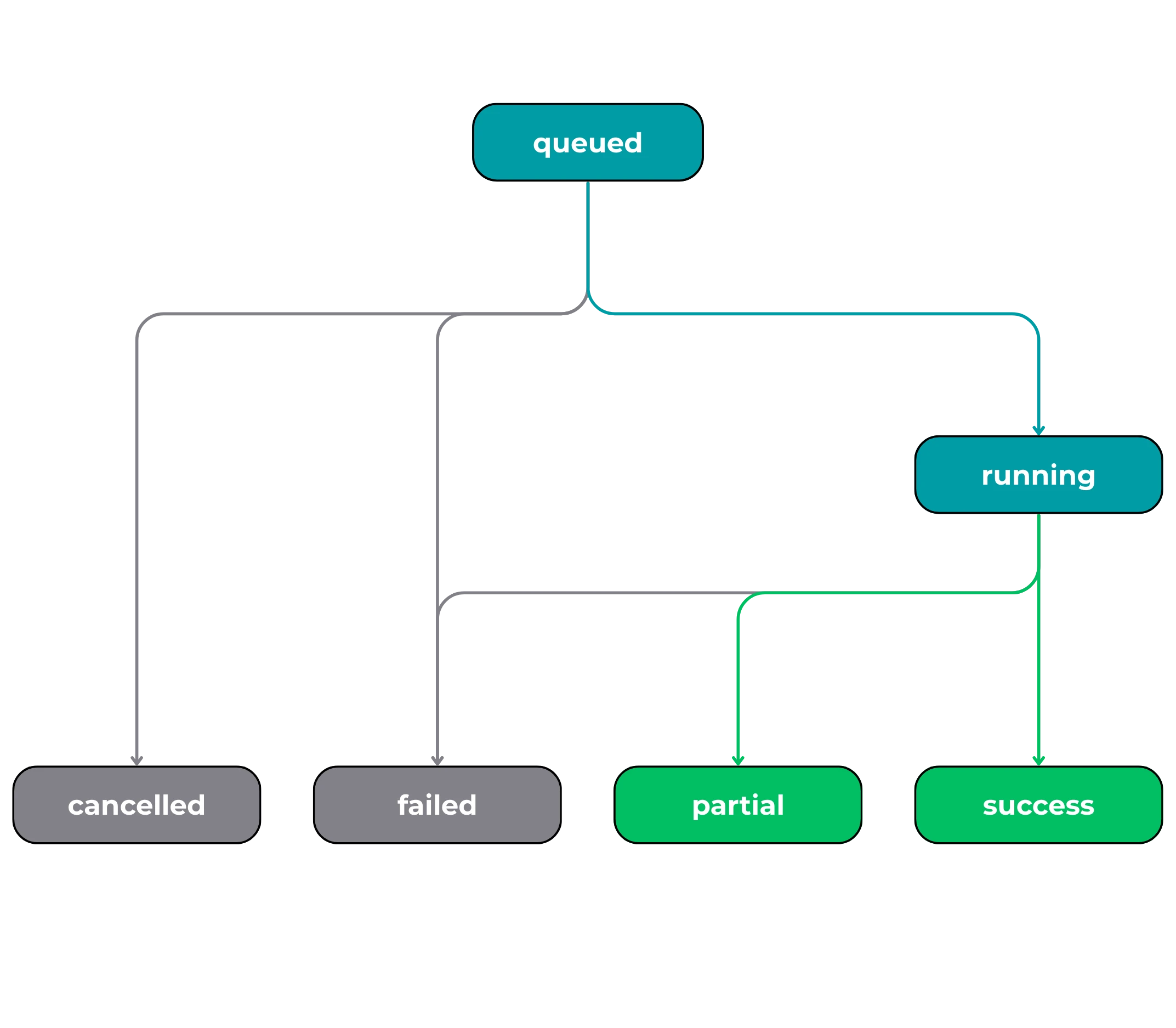
Order states
| State | Description |
| ------------- | -------------------------------------------------------------------------------------------------------------------------------------------------------------------------------------------------------------------------------------------------------------------------------------------------------------------------------------------------------------------------------------------------------------------------------------------------------------------------------------------------------------------------------------------------------------------------------------------------------------------------------------------------------------------------------------------------------------------------------------------------------------------------------------------------------------------------------------------------------- |
| **queued** | The order is accepted and in the queue to run. |
| **running** | The order is running - processing, producing, and delivering assets.
The time an order stays in running depends on:
1. The size of the order (assets per order). While orders with more assets take longer to run, the Orders API is designed to service a bulk ordering use case. As such, orders with more assets have a shorter per-asset running time. Wherever possible, Planet recommends creating fewer orders with more assets per order, to keep per-item running times low.
2. The raster processing tools included in the order. Read more about tools in the [Tools & Toolchains page](https://docs.planet.com/develop/apis/orders/tools.md).
3. Some asset types coincide with longer running times. For example, `scenes` orders with a REOrthoTile or SkySatCollect `item_type` may experience longer runtimes. |
| **success** | The order is complete and was successful. All requested data were delivered. |
| **partial** | The order is complete and was partially successful. The state is valid for `order_type` `partial` orders.
Generally, orders with a state of `partial` indicate that some requested items were not delivered because assets were not available, the requester lacked permission to download those assets, or for an indeterminant reason. |
| **failed** | The order failed.
Orders may fail due to permissions issues, lack of availability of certain asset types (especially if the `order_type` is `full`), or other validation issues or internal errors. Any available details on order failure are supplied in the `error_hints` field. |
| **cancelled** | The order was cancelled and will not be completed. |
## Additional Resources
[🎓Planet University](https://university.planet.com/intro-to-planets-data-and-orders-apis)
[Explore video tutorials on how to order data with Planet APIs](https://university.planet.com/intro-to-planets-data-and-orders-apis)
[📓Orders Jupyter Notebooks](https://github.com/planetlabs/notebooks/tree/master/jupyter-notebooks/api_guides/orders_api)
[Check out the Jupyter notebooks tutorial on GitHub for using the Orders API.](https://github.com/planetlabs/notebooks/tree/master/jupyter-notebooks/api_guides/orders_api)