Sentinel 1 GRD
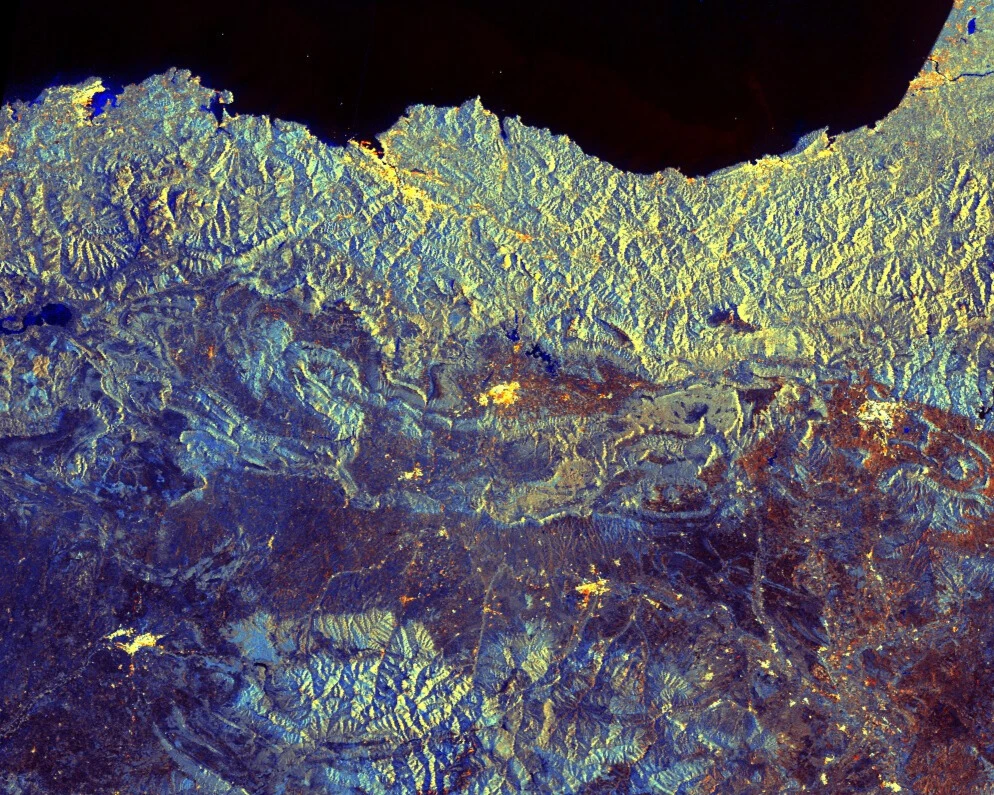
Sentinel-1 imagery is provided by a constellation of polar-orbiting satellites, operating day and night performing C-band synthetic aperture radar (SAR), enabling acquisitions regardless of weather conditions. Main applications include monitoring sea ice, oil spills, marine winds, waves and currents, land-use change, land deformation, and supporting rapid response to emergencies such as floods and earthquakes.
On December 23, 2021, one of the two satellites Sentinel-1B encountered an anomaly of the power unit, causing SAR functionality to be lost, and the satellite will be intentionally deorbited in the future. Thus, between December 23, 2021 and March 26, 2025 (beginning of data availability after successful launch of Sentinel-1C 1) only data from Sentinel-1A is available, which means some areas lost coverage completely, and many others had longer revisit times.
Planet provides access to Sentinel-1 Level-1 GRD (Ground Range Detected) products only. You can explore these datasets in the Browser. Sentinel-1 products are released under the Sentinel Data Legal Notice.
Acquisition Modes and Polarizations
Sentinel-1 operates in four acquisition modes (IW, EW, SM, WV), which determine resolution, swath width, and polarization options. ESA uses predefined Observation Scenarios to schedule these acquisitions globally, ensuring systematic coverage of land, oceans, and polar regions.
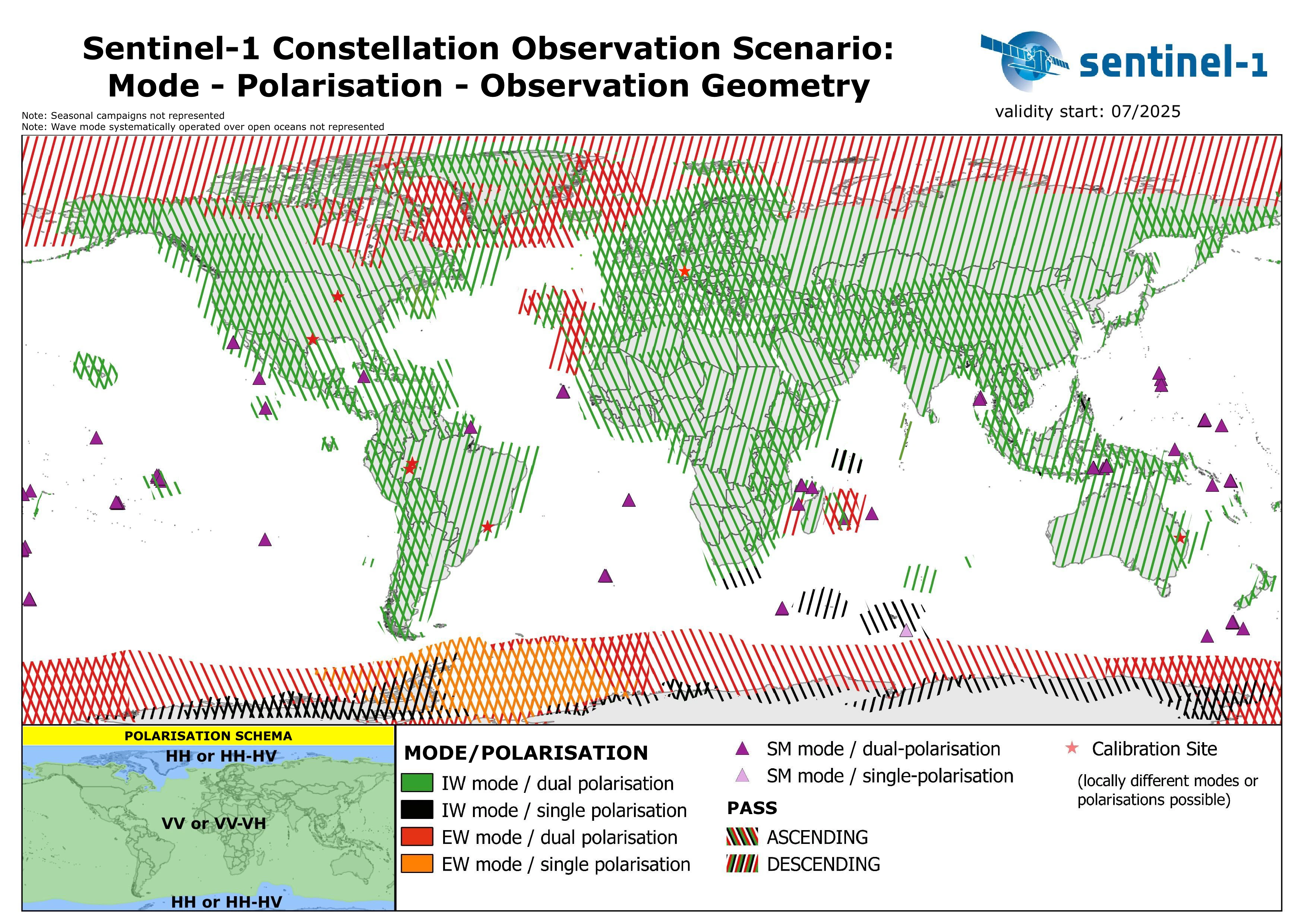
Source: European Space Agency (ESA).
The figure shows the global Sentinel-1 observation scenario, with acquisition modes, polarization schemes, and orbit directions planned across different regions. This scenario ensures systematic coverage of land, ocean, and polar areas.
For more information, see the Sentinel-1 Mission Overview and the Sentinel-1 Applications and User Guide.
Processing
Sentinel-1 GRD data is processed on demand through the Processing API. By configuring processing parameters such as calibration, terrain correction, and speckle filtering, you can generate outputs ranging from minimally processed radar backscatter to fully analysis-ready products.
The following steps describe the available processing operations:
- Source selection: original or multilooked imagery is chosen depending on resolution.
- Calibration and noise removal: radiometric calibration is applied to the selected backscatter coefficient, and thermal noise is removed.
- Speckle filtering: optional speckle filtering methods are available and can be enabled through processing options.
- Radiometric terrain correction (optional): applies radiometric terrain correction using area integration when the backscatter coefficient is set to
GAMMA0_TERRAIN, using a digital elevation model (DEM). - Orthorectification (optional): Range-Doppler geometric terrain correction using a DEM.
- Orbit files included in the products are used and sufficient for GRD applications.
- Areas of border noise are masked.
- Radiometric terrain correction requires orthorectification to be enabled.
- DEM oversampling defaults to 2 but can be adjusted for better results at coarse resolution.
Accessing Sentinel-1 GRD Data
To access data you need to send a POST request to our process API. The requested data will be returned as the response to your request. Each POST request can be tailored to get you exactly the data you require. To do this requires setting various parameters which depend on the data collection you are querying. This chapter will help you understand the parameters for S1GRD data. To see examples of such requests go here, and for an overview of all API parameters see the S1GRD API Reference.
Endpoint Locations
| Service | Notes |
|---|---|
| services.sentinel-hub.com/api/ | Global since October 2014 |
Processing Behavior
-
Features: Zooming out will use multi-looked sources at an appropriate resolution to your viewing level. You can therefore expect high quality results at all zoom levels.
-
Backscatter coefficients: We support all backscatter coefficients.
Data type identifier: sentinel-1-grd
Use sentinel-1-grd (previously S1GRD) as the value of the input.data.type parameter in your API requests. This is mandatory and will ensure you get Sentinel-1 GRD data.
Filtering Options
This chapter will explain the input.data.dataFilter object of the S1GRD process API.
mosaickingOrder
Sets the order of overlapping tiles from which the output result is mosaicked.
| Value | Description |
|---|---|
| mostRecent | (default) The pixel will be selected from the most recently acquired tile. |
| leastRecent | Similar to mostRecent but in reverse order. |
resolution (pixel spacing)
| Value | Description |
|---|---|
| HIGH | 10m/px for IW/SM and 25m/px for EW |
| MEDIUM | 40m/px for IW/SM and EW |
acquisitionMode
Sentinel-1 operates in four different acquisition modes (more).
| Value | Description | Polarization options |
|---|---|---|
| SM | Stripmap mode (more). | HH+HV, VV+VH, HH, VV |
| IW | Interferometric Wide (IW) swath mode (more). | HH+HV, VV+VH, HH, VV |
| EW | Extra Wide (EW) swath mode (more). | HH+HV, VV+VH, HH, VV |
| WV | Wave mode (more). | HH, VV |
polarization
This table contains information about the polarization two letter code used by ESA and the product's contained polarizations.
| Value | Description | Notes |
|---|---|---|
| SH | HH | |
| SV | VV | |
| DH | HH+HV | Typical for EW acquisitions |
| DV | VV+VH | Typical for IW acquisitions |
| HH | Partial Dual, HH only | HH+HV was acquired, only HH is available in this product |
| HV | Partial Dual, HV only | HH+HV was acquired, only HV is available in this product |
| VV | Partial Dual, VV only | VV+VH was acquired, only VV is available in this product |
| VH | Partial Dual, VH only | VV+VH was acquired, only VH is available in this product |
orbitDirection
| Value | Description |
|---|---|
| ASCENDING | Data acquired when the satellite was traveling approx. towards the Earth's North pole. |
| DESCENDING | Data acquired when the satellite was traveling approx. towards the Earth's South pole. |
timeliness
| Value |
|---|
| NRT10m |
| NRT1h |
| NRT3h |
| Fast24h |
| Offline |
| Reprocessing |
| ArchNormal |
Processing Options
This chapter will explain the input.data.processing object of the S1GRD process API.
| Parameter | Description | Values | Default |
|---|---|---|---|
| upsampling | Interpolation method used for resampling Sentinel-1 GRD data when the requested resolution differs from the source resolution. The same method is applied for both upsampling and downsampling. | NEAREST - nearest neighbour interpolation BILINEAR - bilinear interpolation BICUBIC - bicubic interpolation | NEAREST |
| backCoeff [1] | Backscatter coefficient | BETA0 SIGMA0_ELLIPSOID GAMMA0_ELLIPSOID GAMMA0_TERRAIN | GAMMA0_ELLIPSOID |
| orthorectify [2] | Enables/disables orthorectification | TRUE - Orthorectified FALSE - non-Orthorectified | FALSE |
| demInstance | The DEM used for orthorectification | MAPZEN - Mapzen DEM COPERNICUS - Copernicus DEM 10m and 30m [3][4] COPERNICUS_30 - Copernicus DEM 30m [4] COPERNICUS_90 - Copernicus DEM 90m | Deployment-dependent |
| radiometricTerrainOversampling | Sets the DEM oversampling parameter for radiometric terrain correction. Integer values recommended. | 1 to 4 | 2 |
| speckleFilter | Defines the speckle filtering method and parameters to use. | See Speckle Filtering | NONE |
-
For Sentinel-1 GRD, the
downsamplinginterpolation is not configurable and always uses the same method as specified forupsampling. -
The default DEM depends on the deployment:
- EU-Central-1 (Frankfurt):
COPERNICUS_30 - US-West-2 (Oregon):
MAPZEN
- EU-Central-1 (Frankfurt):
[1]: gamma0_ellipsoid and sigma0_ellipsoid use an ellipsoid earth model. Radiometric terrain correction can be enabled by setting the backscatter coefficient to gamma0_terrain; orthorectification must be enabled in this case.
[2]: For orthorectification, we use the DEM instance specified in the demInstance field or the default DEM instance if this is not set. The Copernicus DEM is generally of higher quality and recommended in most cases. The non-orthorectified products use a simple earth model as provided in the products themselves. This may be sufficient for very flat target areas and is faster to process.
[3]: It has 10m resolution inside 39 European states including islands and 30m elsewhere. The 30m DEM is used exclusively if the request resolution is lower (more zoomed out) than 120m/px.
[4]: The Copernicus 30m DEM has global coverage if used for the processing of Sentinel-1 data.
Speckle Filtering
Speckle filtering is applied right after calibration and noise removal and done on source data. To enable speckle filtering, add the speckle filter object with the correct type and parameters to your processing options, as shown in this example.
Available filters:
- The
NONEfilter, which as the name implies, does nothing, and is equivalent to not having the filter defined at all.
"speckleFilter": {
   "type": "NONE"
}
- The LEE speckle filter. Window sizes from 1 to 7 are supported in each dimension. Odd valued window sizes are recommended. Processing time rapidly increases as window size increases. Note also that the effect of the filter depends on the resolution/zoom level; it is most pronounced at native resolution and gets reduced as you zoom out. We therefore suggest you use it at or near native resolution and switch it off at low resolution to save processing time. The effect of the filter is negligible if greatly zoomed out. An example with a 5x5 window:
"speckleFilter": {
   "type": "LEE",
   "windowSizeX": 5,
   "windowSizeY": 5
}
Note: As an alternative or in addition to this, you can also perform multitemporal averaging to reduce speckle.
Available Bands and Data
Information in this chapter is useful when defining input object in evalscript. Any string listed in the column Name can be an element of the input.bands array in your evalscript.
| Name | Description |
|---|---|
| VV | Present when the product polarization type is one of SV, DV or VV. |
| VH | Present when the product polarization type is VH or DV. |
| HV | Present when the product polarization type is HV or DH. |
| HH | Present when the product polarization type is one of SH, DH or HH. |
| localIncidenceAngle | The local incidence angle for each output pixel. Only available if orthorectification is enabled. |
| scatteringArea | The normalized scattering area for each output pixel. Used for conversion of beta0 to terrain corrected gamma0. Only available if radiometric terrain correction is performed. |
| shadowMask | Flags output pixels which are in or near radar shadow. Is true if the nearest GRD source pixel is at most one GRD pixel away from a GRD pixel with a scatteringArea of less than 0.05. Only available if radiometric terrain correction is performed. |
| dataMask | The mask of data/nodata pixels (more). |
Units
The data values for each band in your custom script are presented in the units as specified here. In case more than one unit is available for a given band, you may optionally set the value of input.units in your evalscript setup function to one of the values in the Units Value column. Doing so will present data in that unit. The units parameter combines the physical quantity and corresponding units of measurement values. As such, some names more closely resemble physical quantities, others resemble units of measurement.
The Source Format specifies how and with what precision the digital numbers (DN) from which the unit is derived are encoded. Bands requested in DN units contain exactly the pixel values of the source data. Note that resampling may produce interpolated values. DN is also used whenever a band is derived computationally (like dataMask); such bands can be identified by having DN units and N/A source format. DN values are typically not offered if they do not simply represent any physical quantity, in particular, when DN values require source-specific (i.e. non-global) conversion to physical quantities.
Values in non-DN units are computed from the source (DN) values with at least float32 precision. Note that the conversion might be nonlinear, therefore the full value range and quantization step size of such a band can be hard to predict. Band values in evalscripts always behave as floating point numbers, regardless of the actual precision.
The Typical Range indicates what values are common for a given band and unit, however outliers can be expected.
For Sentinel-1, data values are linear power in the chosen backscatter coefficient. To specify the backscatter coefficient, set BETA0, SIGMA0_ELLIPSOID, GAMMA0_ELLIPSOID (default) or GAMMA0_TERRAIN as the value of input.data.processing.backCoeff in your request. The default is GAMMA0_ELLIPSOID.
| Band | Physical Quantity (units) | Units Value | Source Format | Typical Range | Notes |
|---|---|---|---|---|---|
| Polarization VV, HH, VH, HV | Linear power in the chosen backscatter coefficient (unitless) | LINEAR_POWER | UINT16 | 0 - 0.5 | Can reach very high values (such as 1000); for visualizing a large dynamic range consider converting to decibels: decibel = 10 * log10 (linear). |
| localIncidenceAngle | Angle (degrees) | DN | N/A | 0 - 180 | Computed for each output pixel. Requires orthorectification. |
| scatteringArea | Normalized area (unitless) | DN | N/A | 0 - 2 | Can reach high values on foreslopes. Requires radiometric terrain correction. |
| shadowMask | N/A | DN | N/A | 0 - likely not radar shadow 1 - likely in/near radar shadow | Requires radiometric terrain correction. |
| dataMask | N/A | DN | N/A | 0 - no data 1 - data |
Scenes Object
scenes object stores metadata. An example of metadata available in scenes object for Sentinel-1 GRD when mosaicking is ORBIT:
| Property name | Value |
|---|---|
| dateFrom | '2019-04-02T00:00:00Z' |
| dateTo | '2019-04-02T23:59:59Z' |
| tiles[i].sentinel1ProductId | 'S1A_IW_GRDH_1SDV_20190402T170539_20190402T170604_026614_02FC31_7D8E' |
| tiles[i].date | '2019-04-02T17:05:39Z' |
| tiles[i].shId | 881338 |
| tiles[i].dataPath | 's3://sentinel-s1-l1c/GRD/2019/4/2/IW/DV/S1A_IW_GRDH_1SDV_20190402T170539_20190402T170604_026614_02FC31_7D8E' |
Properties of a scenes object can differ depending on the selected mosaicking and in which evalscript function the object is accessed. Working with metadata in evalscript user guide explains all details and provide examples.
Mosaicking
SIMPLE and ORBIT mosaicking types are supported. TILE mosaicking is not supported for this collection.
Collection specific constraints
- Noise: Thermal noise reduction is applied to all Sentinel-1 GRD products.
- Decibel units: For decibel outputs, a conversion is necessary within your evalscript, see an example here. We offer pre-defined evalscripts, which return S1GRD values in decibel units, as products in the Configuration Utility for your convenience.
- Orbit state vectors: We currently use the orbit state vectors provided in the products themselves as we find these sufficient for GRD use.
CARD4L Data
CARD4L or CEOS Analysis Ready Data for Land refers to Sentinel-1 satellite data that has been processed to a predefined set of requirements (specifically Normalised Radar Backscatter requirements), making Sentinel-1 data analysis ready and thus reducing its complexity. It is especially useful for non-expert users, as it does most of the data preparation work in advance, including geometric and radiometric correction. CARD4L also takes care of obligatory and extensive metadata generation, detailing data provenance, processing parameters, etc.
We have created a CARD4L request generation tool, which makes it easy to process CARD4L compliant Sentinel-1 data. To use it, you will need an enterprise account, which activates access to batch processing. Note that you can get the equivalent raster data with the correct settings in an API request yourself, however metadata can only be obtained using the tool.
Articles and use cases
- We are processing Sentinel-1 CARD4L data for the Digital Earth Africa project. Technical information about the data and how to access it may be found here.
- An Operational Analysis Ready Radar Backscatter Dataset for the African Continent, January 2022
- Intercomparison of Sentinel-1 Datasets from Google Earth Engine and the Card4L Tool, July 2021
Catalog API Capabilities
To access Sentinel-1 GRD product metadata you need to send search request to our Catalog API. The requested metadata will be returned as JSON formatted response to your request. This chapter will help with understanding Sentinel 1 GRD specific parameters for search request.
Collection identifier: sentinel-1-grd
Filter extension
sar:instrument_mode(possible values)sat:orbit_state(possible values)s1:polarization(possible values)s1:resolution(possible values)s1:timeliness(possible values)
Distinct extension
datesar:instrument_modesat:orbit_states1:polarization