Mosaics
About Mosaics
Mosaics are analysis-ready data products created by mosaicking the best imagery over a time period. Planet offers a range of mosaic products, including Visual Mosaics and Normalized Surface Reflectance Mosaics, all designed for visual and/or analytical use.
Mosaics are generated by querying scenes that overlap a specific area of interest within a designated time frame. These scenes are then ranked based on quality metrics metadata, such as the presence of clouds and haze, with the highest-quality scenes placed at the top. Using a "best-on-top" algorithm, the highest quality scenes are efficiently composited to create the final mosaic.
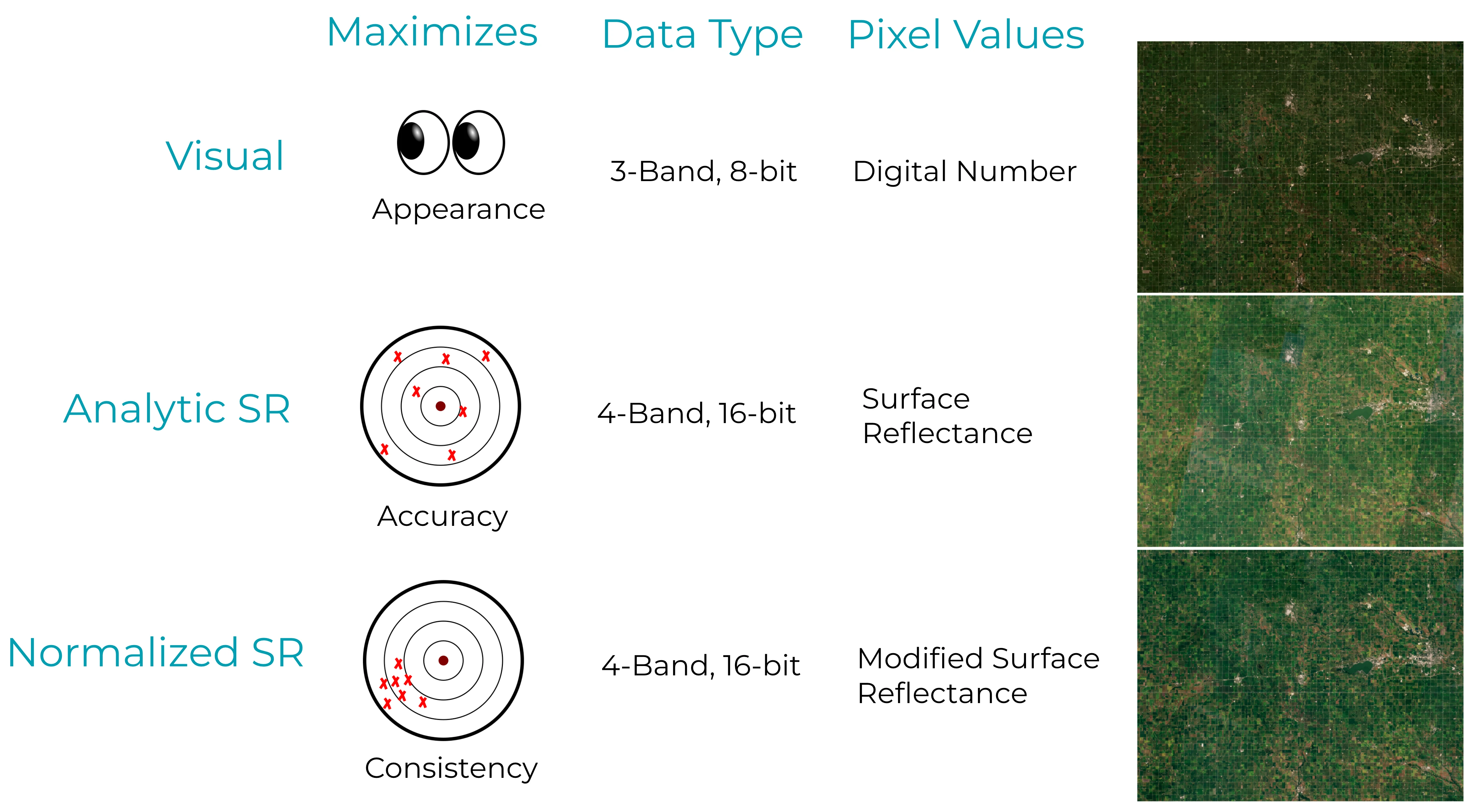 Illustration of different mosaic types and applications.
Global Mosaics
Global Mosaics are generated between 74° North and 60° South to minimize distortion at the poles, using PlanetScope and/or RapidEye imagery. These mosaics are color-corrected and designed for both human viewing and computer vision analytics. The Global Mosaic product is the Q3 Quarterly Visual Mosaic, with distinct pricing due to its global nature. While all mosaic products can be generated globally, this version is created explicitly at a set interval to ensure a consistent global visual product. The Global Mosaic is typically utilized in background GIS applications, or as a visual background.
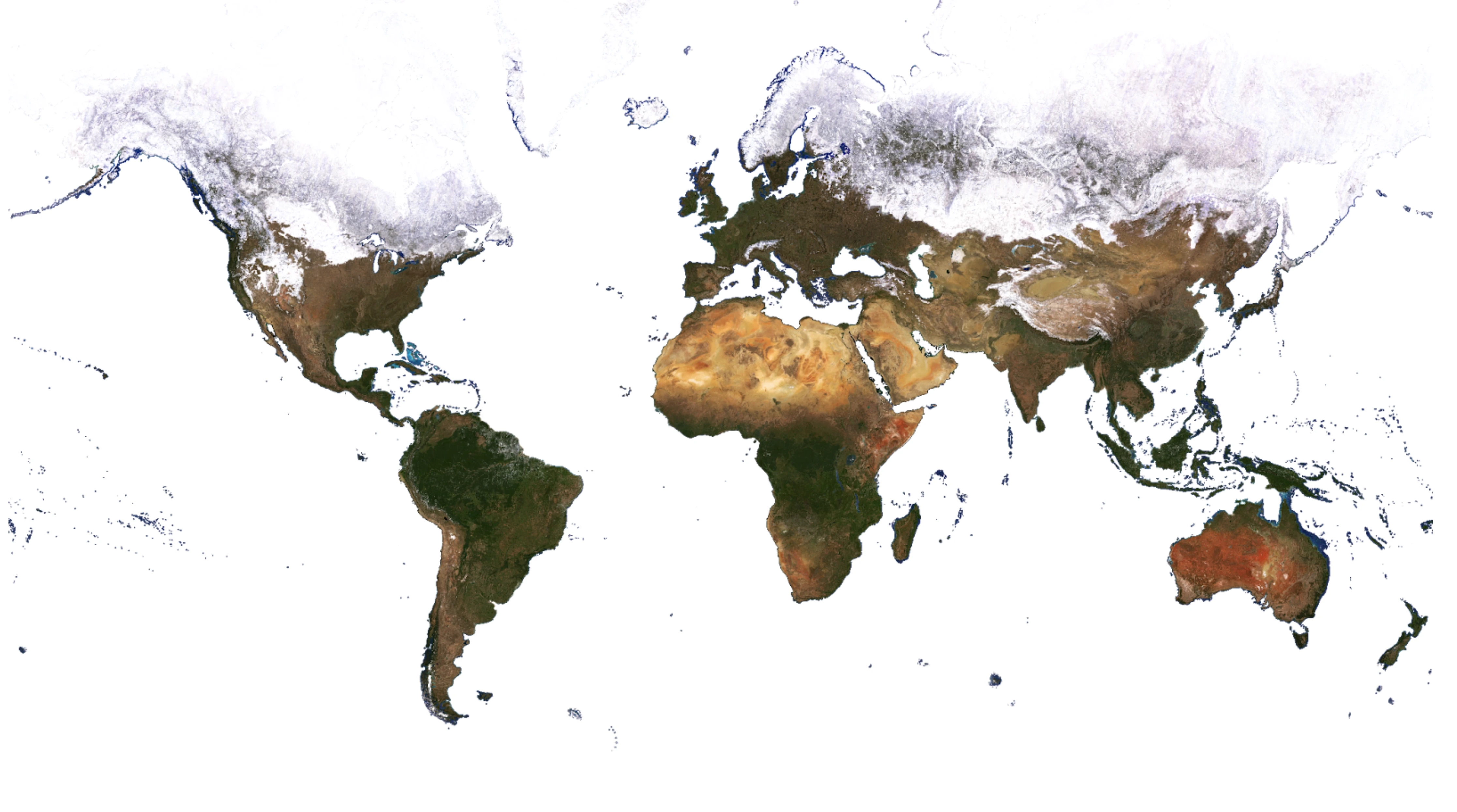 Planet Global Mosaic Q3 2023
Mosaics
Mosaics are generated at weekly, monthly, and quarterly intervals, tailored to customer-specified areas of interest. These mosaics are categorized into two product types: Visual and Normalized Surface Reflectance.
Visual Mosaics
Visual Mosaics are optimized to minimize the effects of cloud cover, haze, and topographic variations. These mosaics are color-corrected and designed for human viewing and computer vision analytics, enabling users to monitor landscape and infrastructure changes over time and space.
| Source imagery | Download bands | Streaming bands | Monitoring frequency | Zoom level | Color target |
|---|---|---|---|---|---|
| PlanetScope and/or RapidEye* Visual Product | RGB | RGB | Weekly Monthly Quarterly | 15 | MODIS |
*RapidEye Imagery is used in Global Mosaics for dates before to February, 2020.
Normalized Surface Reflectance Mosaics
Normalized Surface Reflectance Mosaics are created using the Ortho Analytic Surface Reflectance imagery asset type (ortho_analytic_4b_sr/ortho_analytic_8b_sr). These mosaics are optimized to reduce the variability due to atmospheric effects, enabling users to perform spectral, quantitative, and time series analyses.
Normalized Surface Reflectance Mosaics undergo additional processing steps to improve spatial and temporal consistency, making them less likely to have seamlines. The normalization process involves matching the mosaics to a common reference target. The targets are multi-year monthly composite mosaics, derived using Sentinel-2 imagery, with the goal of enhancing the spatial and temporal consistency of the mosaics, enabling time-series analyses. Nonetheless, the normalization process can result in less accurate absolute spectral values. These mosaics are ideal for use cases where spatial consistency is prioritized or for generating training data for machine learning algorithms. They are particularly suited for longer time periods (for example, monthly, quarterly) where multiple scenes are mosaicked together, and additional image processing is beneficial. Applications include land cover classification, forest disease monitoring, and flood risk analysis.
Mosaics - Normalized Surface Reflectance source imagery
| Source imagery | Download bands | Streaming bands | Monitoring frequency | Zoom level | Color target |
|---|---|---|---|---|---|
| PlanetScope Surface Reflectance | BGRN | RGB, CIR | Weekly Monthly Quarterly | 15 | Sentinel-2 |
| PlanetScope 8-Band Surface Reflectance | CB,B,G,GII,Y,R, RE,NIR | RGB, CIR | Weekly Monthly Quarterly | 15 | Sentinel-2 |
Mosaics - Normalized Surface Reflectance Product Details
| Type | Prioritizes | Data | Pixel values | Normalization |
|---|---|---|---|---|
| Normalized SR | Spatial & temporal consistency; training data | 4-band, 16-bit | Modified Surface Reflectance | Sentinel-2 |
| 8-Band Normalized SR | Spatial & temporal consistency; training data | 8-Band, 16-bit | Modified Surface Reflectance | Sentinel-2 |
Mosaics - availability
| Type | Available after | UDM2 | Pixel provenance |
|---|---|---|---|
| Visual | January 2016 | Mixed | Yes |
| Normalized SR | May 2016 | After August 2018 | Yes |
| 8-Band Normalized SR | August 2020 | Yes | Yes |
Product Specifications
Mosaic quads
Mosaics use the Web Mercator projection, the standard for web mapping applications, due to its efficiency in handling large geospatial datasets. This projection supports a tile-based system, dividing the world into uniform square tiles at multiple zoom levels. This allows for pre-rendered and cached tiles for fast map loading and smooth user interactions in GIS applications. Mosaics are distributed as a grid of GeoTIFF files, which are called quads—the size of each quad is 4096 x 4096 pixels.
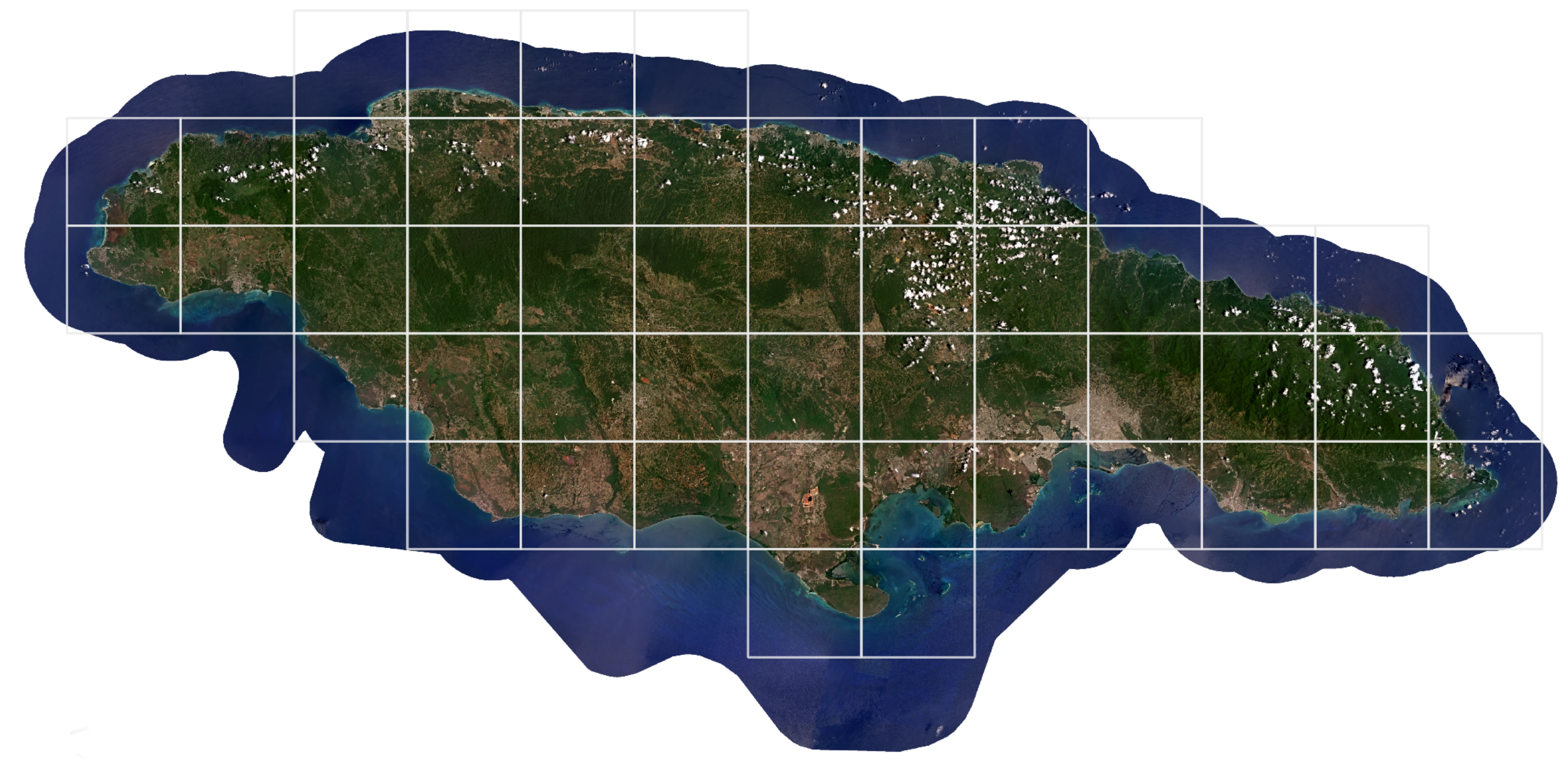 Web Mercator Tiling Grid with Monthly Visual Mosaic of Jamaica, April, 2024
| Attribute | Description |
|---|---|
| Imagery | PlanetScope and RapidEye (Visual) PlanetScope (Surface Reflectance) |
| Pixel Size* | 4.77 m at the Equator for zoom level 15 (PlanetScope and RapidEye) |
| Image Bit Depth | 8-bit (Visual) 16-bit (Surface Reflectance) |
| Bands | Red, Green, Blue, Alpha (Visual) Blue, Green, Red, NIR, Alpha (Surface Reflectance) Coastal Blue, Blue, Green I, Green II, Yellow, Red, Red Edge, NIR, Alpha (8 band) |
| Projection | WGS84 Web Mercator (EPSG:3857) |
| Size | 4096 x 4096 pixels |
| Processing | Orthorectification Atmospheric correction (Surface Reflectance only) May be radiometrically balanced Seamlines may be minimized with tonal balancing |
*The pixel size in meters can be estimated as follows: 4.77 * cos(latitude) m (4.77 m at the Equator) for zoom level 15 (PlanetScope and RapidEye).
Product naming
The name of each mosaic quad represents the x and y position of the quad within the two-dimensional grid which makes up the mosaic. For example, {X}-{Y}, where X and Y are the x and y position of the quad in the grid.
Example:
439-1220
Upon download, the name of the downloaded quad also contains the Zoom Level.
Example:
L15-0439E-1220N.tif
Publication
Planet aims to publish all Mosaics 7 days after the end of the acquisition period. However, there may be instances where publishing may take longer. Publishing times for custom mosaics are determined on a case-by-case basis.
Cadence
Mosaics are generated at a specified cadence based on the first_acquired and last_acquired UTC timestamps for underlying source imagery.
| Cadence | Start (first_acquired) | End (last_acquired) |
|---|---|---|
| Weekly | Mondays at 00:00:00 UTC | Sundays at 23:59:59 UTC |
| Monthly | The first day of each month at 00:00:00 UTC | The last day of each month at 23:59:59 UTC |
| Quarterly | January 1st, April 1st, July 1st, and October 1st at 00:00:00 UTC | March 31st, June 30th, September 30th, and December 31st at 23:59:59 UTC |
Mosaics Delivery
Mosaics can be downloaded or streamed through multiple methods. Below are some of the available options.
Planet Insights Platform
Planet Insights Platform can be used to view and download mosaic quads. A complete tutorial on how to use the Planet Insights Platform to access Mosaics is available in this introductory course from Planet University.
QGIS/ArcGIS Pro plugins
Mosaics can be downloaded or streamed through the Planet QGIS or ArcGIS Pro plugins. These plugins enable users to search for mosaics within the catalog and offer multiple filtering options, such as filtering by area of interest or by different types of mosaics.
Orders API
Mosaics can also be accessed through the Orders API, which allows users to reproject the data to a coordinate system other than Web Mercator, clip mosaics to a specified extent, merge multiple quads, perform band math calculations, and deliver the data to a cloud service provider. However, there are limitations to consider. Users can merge and download up to 25 quads at once. If the merge tool is not used, the limit is 500 quads per order, meaning the provided geometry must encompass fewer than 500 quads. For downloading areas larger than 500 quads, it is recommended to use the Basemaps API.
For more detailed information, see the Mosaics documentation.
Basemaps API
The Basemaps API is recommended for users seeking endpoints for scalable workflows, direct access to Cloud Optimized GeoTIFF links, and the ability to stream mosaics into web applications. Often, users combine the capabilities of both APIs (Orders and Basemaps) when writing their own libraries to access mosaics. The detailed API reference can be found here.
Some use cases of the Basemaps API are:
- Find the quads that intersect an Area of Interest and download those quads.
- Get the list of items that contribute to the particular quad.
- Stream into web applications using the XYZ and WMTS protocols.
- Get a list of series and mosaics available for a user.
Tile Services
Planet's Mosaic WMTS and XYZ tile services provide programmatic streaming access to Mosaics including full bit depth data.
Quad Packaging
Mosaic quads can be downloaded through the Basemaps API and Orders API along with their associated metadata (JSON), UDM2 assets, and pixel provenance raster and vector files, which trace all scenes used when producing the quads. The table below shows the list of files returned when downloading a single quad, and their associated files, for a Normalized SR Mosaic.
| File name | Size |
|---|---|
| 484-1310_quad.tif | 117 MB |
| 484-1310_provenance_raster.tif | 236 KB |
| 484-1310_ortho_udm2.tif | 1.2 MB |
| 484-1310_provenance_vector.zip | 22 KB |
| L15-0484E-1310N.dbf | 788 B |
| L15-0484E-1310N.prj | 425 B |
| L15-0484E-1310N.shp | 66 KB |
| L15-0484E-1310N.shx | 124 B |